43 tools, two modes, and the vector search we chose not to use
An in-product assistant for a fitness studio platform that answers “how do I do this”, answers “what do my numbers say”, and — in the mode where it is allowed to — creates the record for you. The hard problem was never retrieval. It was vocabulary: in this product, “cancel” means four different things with four different audit consequences.
- 3
- agents, split by what each may do
- 43
- tools, every one implemented
- 145
- guides returned whole, never chunked
- 10
- weeks for the agent layer, corpus first
The client and the context
The platform is the back office for a fitness or wellness studio: the class schedule, the memberships and packages that pay for it, the point of sale, the reporting, and every message the studio sends its members. Studios sign up as tenants; under each sit locations, staff with role-scoped permissions, a product catalogue, and a member base whose bookings, payments and attendance all have to reconcile.
It is a deep product. Depth is what studios buy, and depth is what generates support tickets.
Two other case studies cover neighbouring subsystems on this platform — the AI notification template generator and the workflow automation engine. This is the third, and it is the one that had to understand the whole product rather than one module of it.
The problem
Every question a studio owner had went to a human. Not because the answers did not exist — the platform is thoroughly built and its behaviour is consistent. Because the answers lived in the heads of the customer success team, and the path to them was: open a chat widget, describe the problem in your own words, wait, get asked a clarifying question, wait again. A three-step task took twenty minutes of somebody else’s day.
The questions clustered into three kinds, and only the first is what people usually mean by “support”:
- How do I do this? “How do I back-date a package start date?” “How do I merge two client records?” Procedural, answerable from documentation, asked hundreds of times.
- What do my numbers say? “Which classes underperformed last month?” “Who is at risk of cancelling?” Answerable from the database, but only if you know which of thirty report screens to open and how to filter it.
- Just do it for me. “Create a 10-class pack at $180.” The admin knew exactly what they wanted. They needed six form fields filled in, and they were asking a human to talk them through where the form was.
A conventional help centre only addresses the first kind, and does it badly — because the hard part of a studio owner’s question is rarely the answer. It is the vocabulary.
Why this was hard
- The product’s own words are overloaded. This turned out to be the central technical problem. In this platform, “transfer” means one thing for a package and another for a membership. “Cancel” could mean cancel a reservation, cancel a schedule, terminate a membership, or void a transaction — four different screens, four different audit consequences, and one of them irreversible. “Charge”, “group”, “role”, “share”, “comp”, “refund”, “void”, “template”, “tag” and “sales” are all similarly loaded.
- A general-purpose model handles that exactly as badly as you would expect. Asked how to transfer sessions between clients, it invents a plausible flow, describes the buttons confidently, and the admin goes looking for a screen that does not exist. That is worse than no answer: it costs the admin ten minutes and it costs the support team a ticket that now begins “your AI told me to…”
- Studios invent their own vocabulary on top of ours. A studio sells something it calls an “intro pack” or a “drop-in”. Neither is a concept in the product — both are just packages with names the owner chose. An assistant that treats “intro pack” as a real product type will hallucinate rules about it.
- Partial answers are worse than none. Admin procedures are ordered and complete: nine steps, and step seven is “tick this box before saving”. An assistant that returns steps one through five plus a confident summary has walked the user into a half-configured membership. Completeness is not a nice-to-have here; it is the whole value.
- And we wanted it to write. Answering questions is reversible. Creating a product in a live tenant’s catalogue is not. Doing that from natural language, in a shared-database multi-tenant system, means the interesting problems are not prompt engineering — they are authorisation, tenancy, confirmation and audit.
Our approach
1. Build the knowledge base first, then the agent
The git history is unambiguous about the order. The documentation directory fills up across March and April; the first line of the agent code is not written until 21 May. That was deliberate, and it is the decision we would defend hardest.
We wrote 145 admin guides — 159,133 words across 20 modules — each scoped to one task and each carrying the deep link to the screen it describes. We wrote nineteen table-of-contents manifests. And we wrote one module containing no procedures at all, whose entire job is to say what the words mean.
You cannot fix a vocabulary problem in a prompt. We had to write the glossary down.
2. Three agents, split by what they are allowed to do
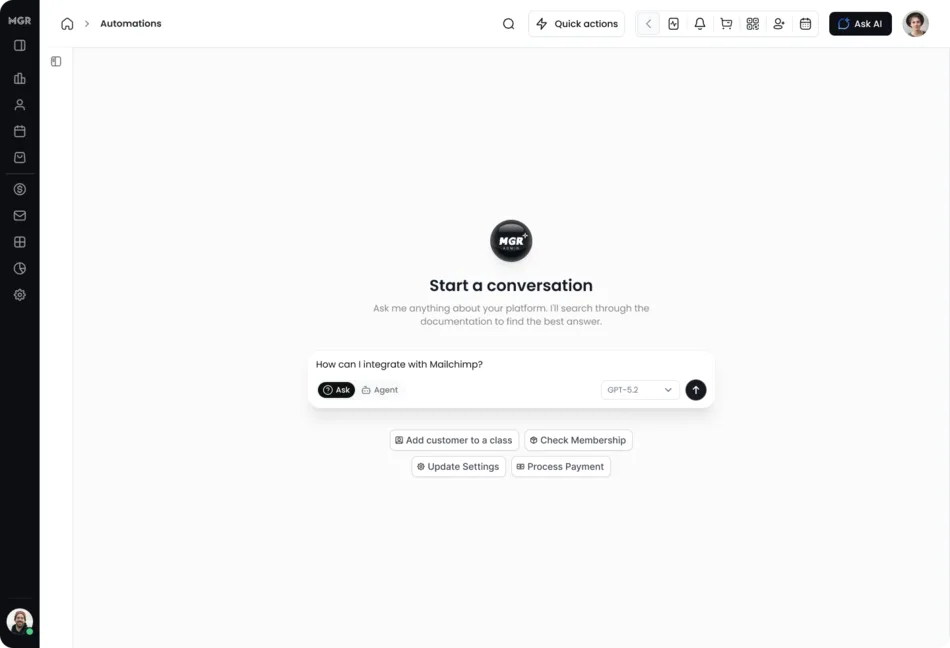
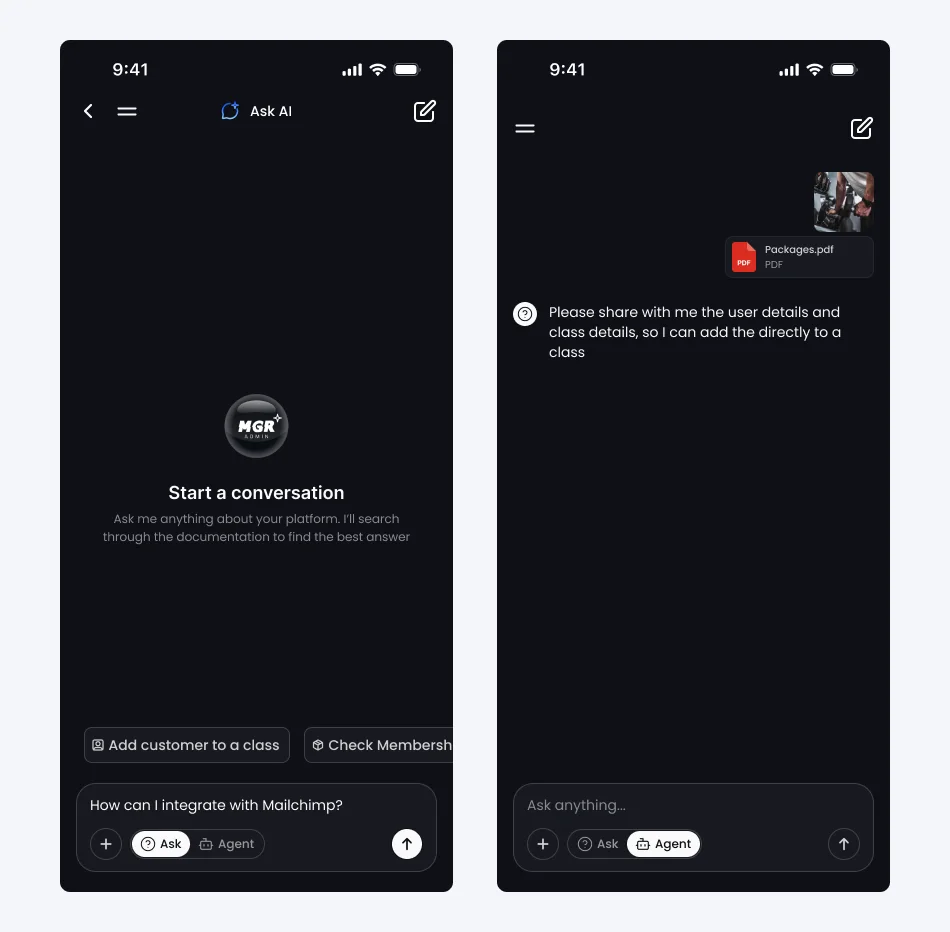
The assistant runs in one of two modes. In Ask mode it answers: a support agent that queries live data and a documentation agent that does nothing else. In Agent mode a third agent joins, and that one can create and update records.
The documentation agent has no database access at all — only its eighteen documentation tools — and its instructions are the bluntest in the system: never answer from training knowledge, never write or summarise documentation yourself, always call a tool, and if a tool returns nothing then say so rather than inventing content.
Model choice and temperature track the stakes. The two read agents run on the cheaper model at moderate temperature; the only agent that can change data gets the stronger model at temperature 0.1. Nobody wants a creative mutation. Staff can also pick the model per conversation, from a registry the platform keeps in step with the provider’s own model list, so a newly released model becomes selectable without a deploy.
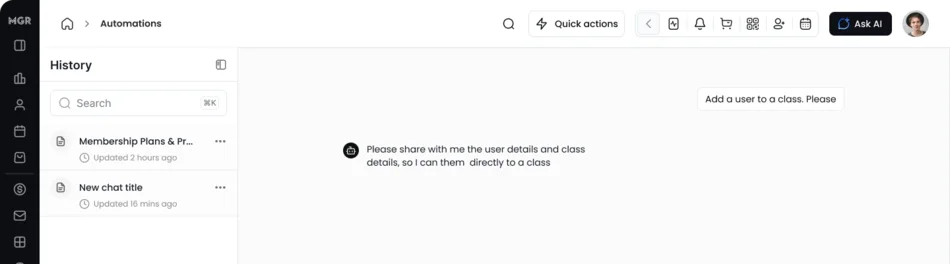
Handoffs are a full mesh — every agent can pass to every other — rather than a triage tree with a router on top. A router adds a model call and a failure point to every turn, and in a three-specialist system each specialist already knows what is not its job.
3. The split was partly forced on us
Safety is the reason we would defend the three-agent split, but it is not the reason we arrived at it. An earlier single-assistant architecture hit a hard platform ceiling, recorded in a commit message: the provider accepts only 128 tool definitions per request. One agent holding every tool does not scale past that, and long before the limit it degrades — a model choosing between 43 tools in one flat list routes worse than one choosing between nineteen relevant ones.
Splitting by capability solved the ceiling and the routing quality at the same time, and then turned out to give us the security property we ended up valuing most. Worth being honest about that order: the constraint came first.
4. Ground the terminology before retrieving anything
The rule that makes the whole thing work is an ordering constraint in the system prompt: before touching any module’s documentation, ground the terminology. Whenever a query contains an overloaded term — or any word the model cannot confidently anchor — it must call the glossary tool first. And if a term is not in the glossary, it is to be treated as the user’s own name for an existing concept, never as evidence of a new one.
That last clause is the fix for the “intro pack” problem, and the glossary names the failures directly: there are no sub-types of package, no starter packs or unlimited tiers, and no “transfer sessions” action. Every one of those phrases is in the glossary because a model produced it and a human caught it.
5. Make asking a first-class outcome
There is a clarify tool, and the prompt documents five conditions that require it — including one no amount of retrieval can resolve: two or more system actions could satisfy the request, with different audit, cost or reversibility consequences. Comp is not an unpaid reservation. Void is not a refund.
Clarifying returns structure rather than prose: a one-sentence summary of what the agent understood in the user’s own vocabulary, the reason for the ambiguity, and two to four concrete interpretations to choose between. There is also a counter-rule so the agent cannot hide behind it — do not use clarify for anything you could answer yourself. An assistant willing to ask one short question is more useful than one that is always confident.
Decisions we made — and what we deliberately didn’t build
We built a vector search pipeline and then kept it off the query path
This is the decision that needs explaining, because on paper it looks like waste.
The ingestion pipeline is real and it is good. Documents are chunked on markdown heading boundaries rather than fixed offsets, so a chunk never splits mid-procedure, and an overflowing chunk inherits its parent heading trail. Each chunk is prefixed with its position in the hierarchy before being embedded — module, document, section — which is the contextual-retrieval technique and measurably improves recall. URLs, images and code fences are normalised to tokens so embeddings encode meaning rather than incidental link noise. Embeddings are 1536-dimension, stored in PostgreSQL via pgvector behind an ivfflat index on cosine distance, with a hand-tuned relevance boost favouring chunks with headings and a single-section focus.
The live agent never calls it. Nothing on the query path embeds the user’s question.
Here is why. The accuracy rule we had to honour is include every step from the guide — no skipping, merging or summarising. You cannot honour that with the top two 600-character chunks. A nine-step procedure is not in two chunks. Chunked similarity search is the right tool when your corpus is large, unstructured, and written by people who were not thinking about retrieval. Ours was 145 guides, each deliberately scoped to exactly one task, each written by us, with a table of contents we also wrote.
For that corpus a different design wins: give the model a tool per module, a topic list per tool, and let it navigate. It reads the index, picks the guide, and gets the whole guide. No similarity threshold to tune, no chunk boundary to fall down, no possibility that step seven of nine did not make the cut. The tool descriptions carry the routing knowledge embeddings would otherwise have to infer — one of them exists purely because “start a membership for this client” is a point-of-sale operation, and no model would guess that.
We replaced similarity search with curation plus routing. The trade is explicit: we accept the cost of hand-writing an index and a topic map, and in exchange we get deterministic retrieval with no recall cliff. The embedding pipeline stays populated and indexed, because the day the corpus grows past what a human can curate — or the day we open it to member-facing content — is the day we need it. It is infrastructure we were early on, not infrastructure we were wrong about.
Write capability is structural, not instructional
Mode is resolved server-side before the model is invoked. In Ask mode the write agent is never constructed, so its six write tools are not in the tool list the model receives.
This matters more than any prompt rule. A prompt that says “do not create records” is a request. A tool list containing no write tools is a fact. There is no jailbreak, no injected instruction and no clever roleplay that reaches a capability the model was never given.
The tenant is not in the model’s vocabulary
No tool accepts a tenant identifier as a parameter. Every one resolves the tenant from server-set context and raises if it cannot. The model cannot be persuaded to operate on another studio’s data, because it has no way to express which studio it means. The same applies to retrieval: the platform and audience filters on every documentation lookup are set server-side too.
What we did not build
No class creation. Six write tools: create a client, update a client, create a product, toggle a product’s active flag, toggle its online-sales flag, and book a client into an existing class. Creating a class touches recurring schedules, instructor availability, room capacity and existing reservations. That is not a five-field form, and we were not going to let a chat message do it. No deletes, no refunds, no voids.
No client notes. Notes are not exposed as a tool, and rather than let the agent improvise around the gap the prompt handles it explicitly: name the unavailable operation, mention the closest supported action conversationally, and — spelled out because the model tried it — do not suggest creating a client as a workaround, and do not confirm, simulate or call an unrelated tool.
No autonomous documentation writer. The authoring is agent-assisted and human-reviewed, and we did not try to remove the human. More on why below.
Architecture and implementation
One user message becomes one server-resolved turn. Everything that determines what the model is capable of is decided before the model is invoked.
- 1Resolve identityTenant and staff member come from the session, never from the message. The audience is pinned to admin.
- 2Decide the modeAsk or Agent, resolved server-side. The mode decides which agents get constructed, and therefore which tools exist at all.
- 3Persist the turnFind or create the chat, store the system prompt on first use, save the user message, process attachments.
- 4Build or reuse a runnerRunners are immutable and cached per model and mode, so 40-plus tool schemas are not rebuilt on every request.
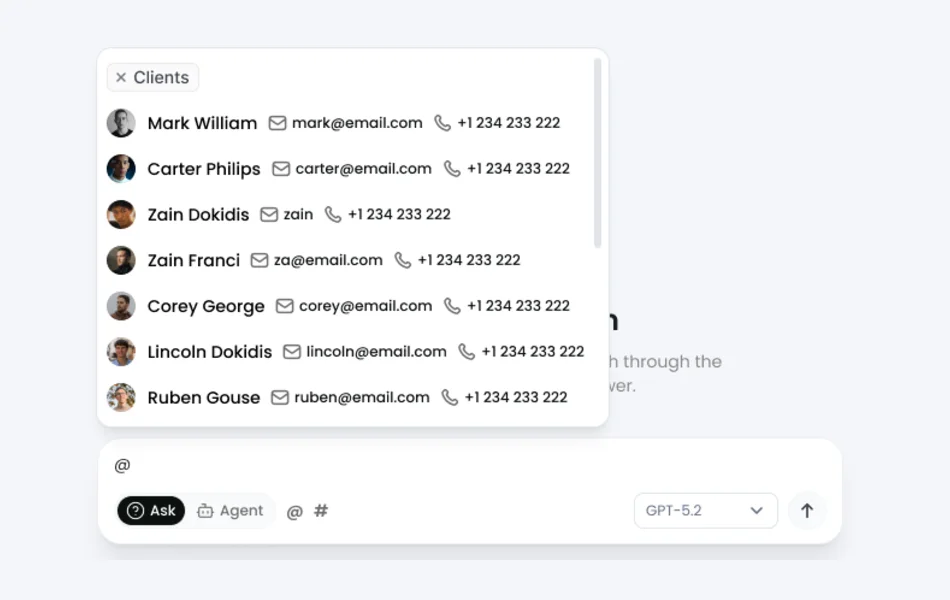
- 5Inject prefetched contextAnything the user tagged with an @-mention is resolved to a real record server-side and handed to the agent before it runs.
- 6Run the loopGround the terminology, read an index, fetch a guide or query live data, hand off between agents, or ask for clarification.
- 7Persist everythingEvery message the run produced, including the assistant tool-call envelope, plus each tool call with its arguments and the agent that produced it.
Engineering deep dive Tool inventory, how tools teach the model to recover, runner caching and @-mention prefetch, a stateless API hosting a stateful conversation, and the documentation pipeline.
Tool inventory
43 tools, and — unlike the workflow engine next door, where a fifteen-type action taxonomy has seven wired implementations — every one of these has a real implementation.
| Category | Count | What they do |
|---|---|---|
| Documentation | 18 | One per product module, plus the domain-knowledge glossary |
| Read and data | 14 | Clients, classes, products, staff, reservations, and four report tools |
| Shared | 5 | Clarify, current business context, greeting, image analysis, out of scope |
| Write | 6 | Create and update client, create product, two product flags, book into class |
The four report tools are where the “what do my numbers say” questions land: class performance, revenue, member retention risk, and a general report generator.
Tools talk to the model, not just to the user
Every write tool returns structured JSON carrying an error class and a hint field addressed to the model — which required fields exist, and what to ask the user for. The agent prompt is the other half of that contract: relay the hint as a suggestion, and do not retry with the same data.
That last rule is there because the default failure mode of a tool-calling agent is to retry an invalid call until it burns its turn budget. Teaching the tool to explain itself is cheaper than teaching the prompt to anticipate every error.
Two optimisations, both boring in the good way
Runners are cached. Building one means constructing more than forty tool schemas. Doing that per request is pure waste, so runners are cached per model and mode behind a mutex — safe because the agent runner is immutable and thread-safe by the library’s guarantee.
@-mentions skip the round trip. The composer lets a staff member tag entities and modules. Those tags reach the server, which resolves them to real records and preloads the relevant data snapshot before the model runs. The agent begins the turn already holding the data, and spends no tool call fetching what the user explicitly pointed at. The UI already knows what the user selected; making the model guess and then fetch is a round trip we chose to delete.
One honest wrinkle: the picker that finds those records runs its own SQL LIKE query rather than going through the platform’s global search pipeline, which means the product currently holds two different definitions of “search for a person” — one with prefix matching, field weighting and exact-match promotion, one without. Consolidating them is a roadmap item on both write-ups.
A stateless API hosting a stateful conversation
The API is stateless; the conversation is not. What round-trips through the JSONB column on the chat row is deliberately narrow — routing metadata only: which of the three agents currently holds the conversation, the turn count, the business context. The transcript itself is not stored there. It is rebuilt from the message rows on every request, so there is exactly one copy of the history and no possibility of two copies drifting apart.
The cost of that choice, named honestly: there is no summarisation or truncation. Every non-system message is loaded on every turn, so a long conversation gets progressively more expensive and will eventually meet the context window. For chats that resolve a support question in a handful of turns this is the right trade. It is the first thing that breaks if the assistant becomes somewhere people hold long-running conversations.
The subtle bug in that area was message persistence. An assistant message with empty content but populated tool calls looks like nothing worth saving, and the obvious “skip blank messages” rule drops it. The provider then rejects the next turn, because a tool-role message whose matching assistant envelope is missing is invalid history. So the rule has an exception and a comment explaining it. It only breaks on the turn after a tool was used, which is exactly the kind of bug that reaches production.
Tool-call persistence is idempotent, backed by a unique index on the provider’s tool-call id. In the workflow engine we noted the equivalent check had no unique index behind it. Here it does — and so does the audit table’s idempotency key. That lesson got applied, and the revenue ledger built on this platform afterwards took it further still, with two unique indexes because one of them silently does nothing when a column is nullable.
What is observable
Langfuse instruments the runner across eight callbacks: run start, agent thinking, LLM call complete with token usage, tool start, tool complete, handoff with the model’s stated rationale, agent complete, run complete. Every turn on this path is traced — worth noting because the notification-template builders in the neighbouring case study are not, and that gap is still open.
Durably in the database: every tool call with its arguments, and which agent produced each message. Token counts are the honest exception. The message table has input and output token columns and there is a rollup that sums them per chat and platform-wide, but nothing on the current path writes them, and the rollup filters out null rows accordingly. Per-turn token usage is captured in Langfuse; the database columns are aggregation machinery waiting to be fed.
The documentation pipeline
The half that is automated is availability. A guide changes; ingestion re-chunks only files whose modification time is newer than the last processed document, re-embeds only chunks that have no embedding or an embedding from a superseded model, and rebuilds the module hierarchy and index manifests. Swapping the embedding model triggers a full re-embed with no manual backfill. YAML frontmatter on each guide declares platform and audience, with filename and path conventions as fallback, and those fields become the retrieval filters.
The half that is not automated is authoring, and deliberately so. When a feature ships, a coding agent writes the documentation update as part of the same change, against house templates that live in the repository and are excluded from ingestion. A human reviews it in the pull request. On merge, ingestion makes it available to the assistant.
The review is not purely human, though, and this is the part of the pipeline we like most. A CI spec lints the corpus itself, because the assistant streams this content back to end users: a hardcoded hostname becomes a broken link in a customer-facing answer, a markdown cross-reference becomes a URL ending in .md, and a dynamic URL without ID-prompting ends up with a literal {user_id} in the response. Those are the same three failures the assistant’s own URL policy guards against, so each is defended twice: the prompt tells the model at runtime, and CI tells the author at merge time.
When a corpus is going to be read aloud to customers by a machine, its formatting conventions stop being style and become correctness — and the right place for correctness is a failing build.
How we worked
Two phases, in an order that mattered.
March to April 2026 — the corpus. 145 guides, 20 modules, 19 index manifests, and the domain-knowledge glossary. Unglamorous, and the reason the rest worked.
21 May to 29 July 2026 — the agent. Three agents, 43 tools, the persistence layer, the mode gating, the tracing. Roughly 1,490 lines of chat-specific specs, concentrated on the plumbing: orchestrator, runner, session, context builder, message persistence, error reporting.
Prompt changes were verified by reading transcripts. That is the honest description, and it is also the biggest process gap — see below.
Results
The change is that the three kinds of question now have three different destinations, and only the genuinely novel ones reach a human. Procedural questions get the complete guide with a deep link to the exact screen. Data questions get answered against live data, in the conversation. And an admin who knows what they want can say it and have it exist.
| Metric | Before | After |
|---|---|---|
| Where a “how do I” question goes | A person in customer success | The complete guide, with a deep link to the screen |
| Where a “what do my numbers say” question goes | One of thirty report screens, if you know which | Answered against live data, in the conversation |
| Creating a product from a request | Talk an admin through a form | The admin describes it; the agent writes it after confirming |
| Documentation the assistant can quote | — | 145 guides, 159,133 words, returned whole |
| Tools reachable by the model in Ask mode | — | 37 — the six write tools are absent, not forbidden |
| Tenant parameters the model can set | — | None. Tenancy is server-resolved and fails closed |
| Turns traced end to end | — | Every one, across 8 instrumented callbacks |
| Agent writes with a durable outcome record | — | Not yet — see below |
The commercial numbers — ticket volume before and after, deflection rate, weekly active staff, monthly model spend — are the client’s to publish rather than ours to estimate. What we can state from the code is that tool names and arguments are recorded, so “which guides do people actually need” is a query rather than a survey.
What we would fix next
Wire up the audit log. There is a table with exactly the right shape — capability, status, staged progress, outcome records, duration, database time, query count, external calls, and an idempotency key behind a unique partial index. Nothing writes to it. Today an agent-performed write is recorded only as a tool-call row with its arguments: you can see that a product creation was called and with what, but not whether it succeeded, how long it took, or what it produced. For a feature whose whole risk profile is “an AI changed my data”, that is the gap we would close first, and the schema is already waiting.
Add role-level authorisation. Tenancy is enforced properly and fails closed. Authorisation is not checked at all — no tool consults the platform’s own role and permission model, which exists and is documented. Any staff member who can reach the Agent-mode endpoint gets all six write tools. That is fine for a pilot scoped to owners and managers, and it is not fine at scale.
Build an eval set. There is no golden set and no scored retrieval test. Prompt changes are validated by reading transcripts, which catches the regressions somebody thinks to look for. For a system whose correctness claim is “every step, no invented concepts”, the absence of a fixture-based score is the process gap we would close before adding capability. Relatedly, no test asserts that every topic declared across the eighteen documentation tools resolves to a real document — rename a guide and a topic starts returning “not found” at runtime rather than failing a build.
Two smaller ones, honestly noted. The number of sessions in a package is parsed out of the product name by regular expression and defaults to ten, so a product called “Summer Pack” quietly becomes a ten-session package. And confirmation before a write is enforced by prompt rather than by code, so a model ignoring its instructions could perform a well-formed unconfirmed create.
What’s next
Members, not just staff. Today the assistant is authorised for studio staff and the audience is pinned to admin. The audience dimension is built end to end — frontmatter, ingestion, retrieval filters — but no member-facing documentation exists yet. Writing that corpus opens the assistant to the studios’ own customers, which is a much larger surface, and the point at which curated routing may stop scaling and the vector pipeline earns its place.
Turning the audit log on, and with it the ability to show a studio owner exactly what the assistant did in their account last week.
More write coverage, gated the same way: capability granted by mode, tenant from context, confirmation before commit, and now audited.
If this sounds like your system
The pattern generalises well past fitness studios. If you have a deep product, a support team answering the same procedural questions, and a vocabulary where one word means four things in four modules, the useful lessons are these.
Write the glossary before you write the prompt; a vocabulary problem cannot be prompted away. Curate the corpus before reaching for embeddings, because for a bounded, well-structured corpus deterministic routing beats similarity search and has no recall cliff. Grant capability structurally — if the model must not do something, do not give it the tool. Keep the tenant out of the model’s vocabulary, because if it cannot name another tenant it cannot reach one. Let tools teach the model how to recover; a hint field is cheaper than a longer prompt. And audit the writes before you ship the writes — we did not, and it is the first thing on our own fix list.
This is the kind of work our agentic AI development and AI and ML engineering teams do, on top of the APIs and admin applications that carry it.
Tech stack
Backend
- Ruby 3.3.9
- Rails 7.1 (API)
- Puma
AI
- OpenAI GPT-4o
- GPT-4o mini
- RubyLLM
- ai-agents gem
- Langfuse
Retrieval
- 145 curated guides
- YAML frontmatter
- 19 index manifests
- pgvector (ingested, off the live path)
Data
- PostgreSQL 16 + pgvector
- Redis
- 11 tables
Async
- Sidekiq
- Incremental ingestion and re-embedding
Observability
- Langfuse tracing across 8 runner callbacks
- Durable tool-call records
Infrastructure
- GitHub Actions CI
- Additive migrations
- Corpus linting in CI
Frequently asked questions
Is this a chatbot bolted onto a help centre?
No. It shares a database with the product it explains, so it can answer “how do I run this report” and “what does this report say for me this month” in the same conversation, and then create the record you decided to create as a result.
You say RAG, but there is no vector search on the live path. Which is it?
Both statements are true and the distinction is the interesting part. There is a full embedding pipeline — pgvector, 1536-dimension embeddings, an ivfflat cosine index, heading-aware chunking with contextual enrichment — and it is populated. The live agent does not query it. It navigates a curated index of 145 guides using one tool per module, because our accuracy requirement is “include every step” and two 600-character chunks cannot satisfy that for a nine-step procedure. It is agentic retrieval over a curated corpus rather than similarity search over an embedding index. The embedding infrastructure is there for the corpus size we do not have yet.
How do you stop an assistant inventing features that do not exist?
Three layers. A glossary tool it must consult before any module documentation, which names the specific hallucinations we saw in testing. A rule that an unknown term is treated as the user’s own name for an existing concept rather than evidence of a new one. And a clarify tool with documented conditions for asking rather than guessing, including when two candidate actions differ in reversibility.
How do you give an AI agent write access to production data safely?
Grant capability at construction rather than by instruction. In read mode the write agent is never built, so its tools are not in the list the model receives — a prompt saying “do not create records” is a request, while a tool list containing no write tools is a fact. Beyond that: no tool accepts a tenant parameter, inputs are validated before the write, and failures return a structured hint telling the agent what to ask the user for rather than to retry.
How do you keep a multi-tenant AI assistant from reaching another tenant’s data?
Keep the tenant out of the model’s vocabulary entirely. No tool accepts a tenant identifier as a parameter; every one resolves it from server-set request context and raises if it cannot. The model cannot be talked into operating on another customer’s records because it has no way to express which customer it means. The same applies to retrieval, where the platform and audience filters are also set server-side.
Why split one assistant into several agents?
Safety is the reason we would defend it, but a platform ceiling is what forced it: one agent holding every tool runs into the provider’s per-request tool limit, and degrades well before it, because a model choosing between 43 tools in a flat list routes worse than one choosing between nineteen relevant ones. Splitting by capability fixed the ceiling, the routing quality and the security model at once. Worth being honest about that order.
Is the documentation really written by AI?
Written by an agent, reviewed by a human, ingested automatically. When a feature ships, a coding agent drafts the documentation update as part of the same change; a person reviews it in the pull request; on merge the pipeline re-chunks and re-embeds only what changed. The reviewer is not a bottleneck we failed to remove — the assistant’s promise is that it repeats procedures exactly as written, and that promise is only safe if somebody signed off on the writing.
How long does it take to build an agentic assistant into an existing product?
Ours was about two months on the documentation corpus, then roughly ten weeks on the agent layer, and the order was the point. You cannot fix a vocabulary problem in a prompt, so the glossary and the guides came first. If your product already has a maintained, well-structured corpus, the second half is the only half you are paying for.
Have a system that looks like this?
Bring us the part you have been putting off — the wide surface of manual configuration nobody finishes, the AI feature you are not sure how to make safe, the legacy job that keeps failing. We will tell you what we would build and what we would leave alone.