
14 triggers, 4 rules, and a no-show email we never built
A fitness studio platform needed automations its customers could author themselves. Marketing tools were useless for the job — they cannot see that a member booked a class, redeemed a package or failed a payment. So we built the engine inside the system of record, and studios started automating events the product has no trigger for.
- 14
- domain triggers, usable mid-workflow
- 25
- step types studios compose freely
- 15
- condition fields, 2 of them history aggregates
- 9
- months across two phases, no cutover
The client and the context
Our client operates a multi-tenant platform that runs the operational back office for fitness and wellness studios: scheduling, bookings and waitlists, packages and memberships, payments, retail, reviews and staff management. Each studio is a tenant inside a shared PostgreSQL database. It is the same platform we built the AI notification template layer for, and the two pieces meet — the workflow actions send those templates.
The platform already sent transactional messages well: booking confirmations, cancellations, payment failures. What it could not do was let a studio express its own business logic. “If someone books their first class and doesn’t come back within fourteen days, send them this.” Every studio has a dozen rules like that, and every studio’s dozen is different.
The problem
Studios had two options before this shipped, and both failed for the same underlying reason.
The first was to buy a marketing automation tool and wire it up. This is the obvious answer and it does not work, because those tools have no idea what a class is. They can see an email address and a purchase webhook. They cannot see that a member booked the 6am spin class at the downtown location, was checked in, redeemed the third credit on their ten-pack, or had a membership payment fail. The events that actually drive retention in a studio business are domain events, and domain events only exist inside the system of record.
The second option was to do it by hand: pull a report, filter it in a spreadsheet, send a campaign. Some studios did exactly this, which means the work only happened when someone remembered, and the timing was always wrong — a win-back email is worth something on day fourteen and nothing on day sixty.
The third option, for us, was the trap: hard-code automations per studio on request. That path ends with engineering owning every studio’s marketing calendar.
Why this was hard
- Users author the logic, so the logic is untrusted input. An admin composes conditions in a browser. Those conditions have to be evaluated server-side against production records without
eval, without dynamic method dispatch on user strings, and without letting one tenant’s rule read another tenant’s data. - The interesting automations are not linear. “Send an email” is a sequence. “Wait a week, and branch on whether they came back” is a graph with success and failure edges, and a journey that has to survive being parked for days.
- Time is a first-class concern, and relative. Useful delays are not “in 24 hours” — they are “12 hours before the class starts” and “2 days after the payment date.” That means reading a timestamp off whichever domain record triggered the workflow.
- You cannot cancel a scheduled job. Once a delay timer is queued for next Tuesday, it is queued. If the journey moves on, gets paused, or the studio deactivates the workflow, that timer will still fire.
- Every workflow runs against live members. A duplicated event means a member gets the same email twice. A workflow that loops means they get it forty times.
- Conditions include aggregates. “Clients who have spent over $1,000 on memberships at this location in the last six months” is a real thing studios want to automate on, and it cannot be answered from the triggering event alone.
Our approach
1. Make every node the same shape
The core of the engine is a nineteen-line model. A workflow step is a graph node holding a polymorphic payload — a trigger, a rule or an action — plus two edges, next_step and fail_step. All three step kinds implement one method. Two consequences fall out immediately: branching is a property of a node rather than a special construct, and adding a sixteenth action type is a new subclass, not an engine change.
2. Treat conditions as data, validated on write
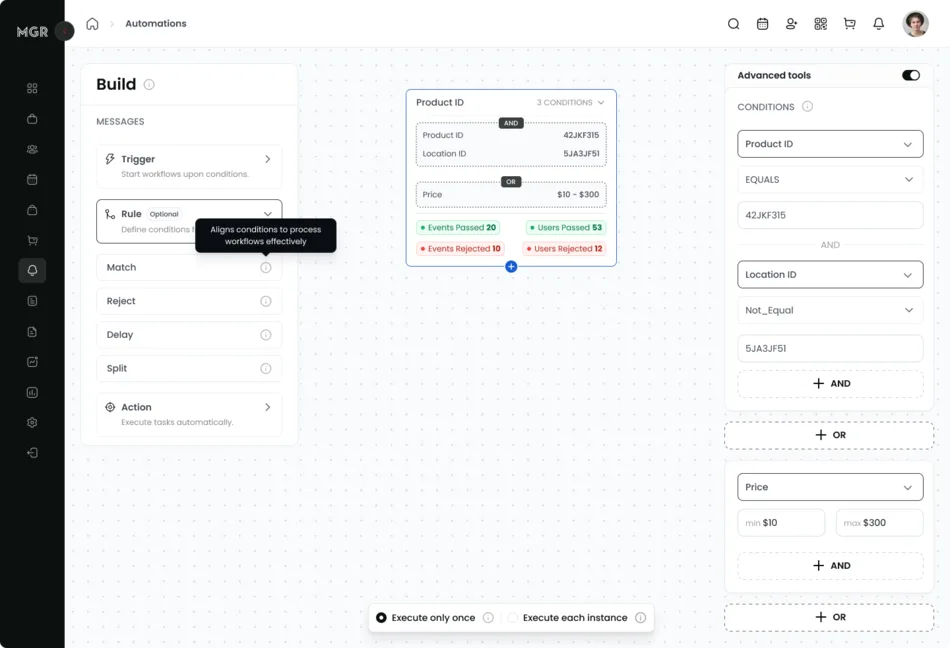
Conditions are JSONB — nested and/or trees of {field, operator, value}. Nothing is ever interpreted as code. Field names are whitelisted per step type, operators are whitelisted per field type so a text field cannot be handed a numeric comparison, and validation runs when the workflow is saved rather than when it executes. A malformed workflow is rejected at the API boundary, in the builder, while the admin is still looking at it.
3. Let a trigger appear in the middle of a workflow
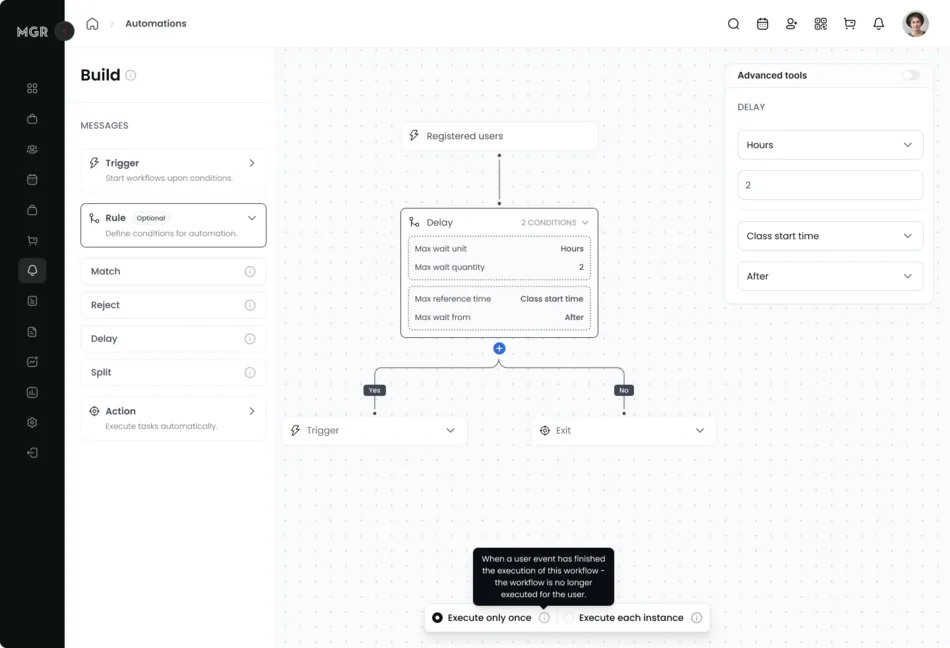
This is the design decision the whole feature rests on, and it is the one that produced the no-show email. A workflow does not just start with a trigger; it can wait on one. When execution reaches a trigger node that is not the event currently being processed, the journey parks itself and waits for that event to arrive — optionally with a maximum wait, after which it takes the failure edge instead.
That single mechanism turns the trigger list from a menu into a vocabulary. There is no “no-show” trigger in the product. There never has been. But a studio can build one: trigger on Booked Class, delay a few hours past the class start time, then wait on Attended Class with a maximum wait. If attendance arrives, the success path runs. If the wait expires, the failure path runs — and the failure path is the no-show. Studios worked this out for themselves, and it is now the documented recommendation in the product’s own help centre.
4. Make timers self-invalidating instead of cancellable
Since a scheduled job cannot be recalled, we made every timer harmless when stale. Each scheduled worker is handed the step the journey was sitting on when the timer was set, and does nothing unless the journey is still there, and is neither completed nor terminated. A stale timer costs one cheap database read. Delays measured in weeks became safe without building a cancellation mechanism at all.
Worth naming the alternative, because the same platform contains it: the review request scheduler keeps the job id on the record it belongs to, so a pending invitation can be recomputed when the class it describes moves. That works because a class has exactly one pending request and an obvious place to store a handle. A journey may be parked on any of several timers with no single owner, which is why this side of the platform made the timers harmless instead of addressable. Two answers to “you cannot cancel a scheduled job”, each right for its own shape of problem.
5. Compose workflows through the event log, not through each other
The “trigger another workflow” action does not call another workflow. It writes a synthetic domain event into the same event log everything else uses, and the dispatcher picks it up like any other event. Composition therefore inherits the whole engine — idempotency, guards, history, admin intervention — instead of introducing a second execution path with its own bugs.
Decisions we made — and what we deliberately didn’t build
No workflow DSL, and no rules engine library. It was tempting to give power users a small language. We chose a whitelisted JSONB structure instead, because the builder is the only intended author and every extra expressive step is a new way for a studio to break its own member communications. The constraint is what makes the safety story short: there is no interpreter to sandbox.
Failed actions error the journey rather than crashing it. If an action cannot execute, the journey moves to an error state with a stored reason and stops there. It does not raise, retry blindly, or silently continue to the next step. Surfacing those errors to admins with a retry is named in the code as the intended follow-up, and it is still open work.
Tenant isolation enforced in the model layer, not in queries. Every workflow association declares its tenancy: steps inherit their tenant from the workflow, and step edges, current step, user profile and creator are all checked for tenant consistency on write. A step physically cannot point at another tenant’s step. We preferred paying this at write time over trusting every future query to remember a where clause.
We deliberately did not build cycle detection — and that is a real gap. Workflow A can trigger workflow B which triggers A. Validation checks well-formedness only: a workflow must start with a trigger and every leaf must be an action. The indirect brakes are meaningful — one-time workflows refuse to re-run for a member who already finished, and the idempotency table stops the same event re-entering the same workflow — but two recurring workflows pointing at each other would loop. A depth limit on chained workflows is the correct fix and it is not built. We are saying so here because “no known issues” is never true of a system this size, and this is the one we would fix first.
Architecture and implementation
A domain event enters a shared log, one subscriber turns it into a job, and the dispatcher decides which workflows that event can advance — including ones already parked mid-flight, waiting for exactly that event.
- 1Record the eventDomain events land in a general-purpose event log with polymorphic actor and target, plus request context.
- 2Publish and subscribeRails Event Store fans the event onto a global stream plus per-user and per-tenant streams, where one global subscriber picks it up.
- 3EnqueueA single Sidekiq job carrying three scalars — user, event type, event id. No objects cross the queue boundary.
- 4Find candidatesA three-part union query: workflows whose root trigger matches with no live journey, journeys parked mid-flow on exactly this trigger, and all recurring workflows with a matching root.
- 5GuardHas this event already entered this workflow? Has a one-time workflow already finished for this member? Both checks run before the transaction that creates a journey.
- 6Walk the graphRules and actions execute synchronously inside the one job, advancing the journey pointer, until the workflow reaches something that waits.
- 7Park, or finishA delay, a trigger wait or an action wait schedules a self-invalidating timer and releases the job. The journey resumes on the timer, on the awaited event, or on a provider webhook.
Engineering deep dive The journey state machine, idempotency, the condition evaluator, relative time, and the shape of the code — the detail behind the diagram.
Dispatch
Simple events are created in the model layer; events spanning several entities are created at the command layer. That split keeps the log honest about what actually happened rather than about which code path happened to notice.
The dispatcher translates event class to trigger class by convention, then runs the three-part union query. The second branch — journeys parked mid-flow waiting for this trigger — is what makes mid-workflow triggers work, and it is also the most complex query in the subsystem and the first place we would look if throughput became a concern.
The journey is the state machine
A journey is one member’s progression through one workflow: a pointer to the current step, plus terminated, completed and errored flags and a stored error reason, which project into the four statuses an admin sees — passed, failed, waiting, errored. Advancing marks the current step complete, moves the pointer, and recursively executes the next node, so an entire chain of rules and actions runs synchronously inside one job until it hits something that waits.
A denormalised copy of the current step’s type on the journey row is what lets the dispatcher find parked journeys with an indexed comparison instead of a polymorphic join.
Idempotency, and how strong it actually is
A join table between events and journeys exists for exactly one purpose, and the code comment says so: do not create a duplicate journey for the same application event. Before anything runs, the dispatcher checks whether this event has already entered this workflow, and separately whether a one-time workflow has already finished for this member. Both guards sit before the transaction that creates the journey.
Being precise about the strength of this: the check is application-level, and there is no unique index backing it, so it relies on the dispatcher being the only writer. Pushing it into a database constraint is the cheap hardening step — the AI template feature on this same platform uses a unique partial index for exactly this job, and so does the agentic assistant we built after this. The revenue ledger is where that problem got its most rigorous treatment on this platform, and it needed two indexes rather than one.
Rules and the condition evaluator
Four rule types, deliberately few. Split forks down the success and failure edges, Match continues only if conditions hold, Reject is its inverse, and Delay parks the journey on a timer. Conditions nest arbitrarily — the evaluator recurses whenever it meets an and or or key — so (A and B) or (C and (D or E)) is expressible from the builder.
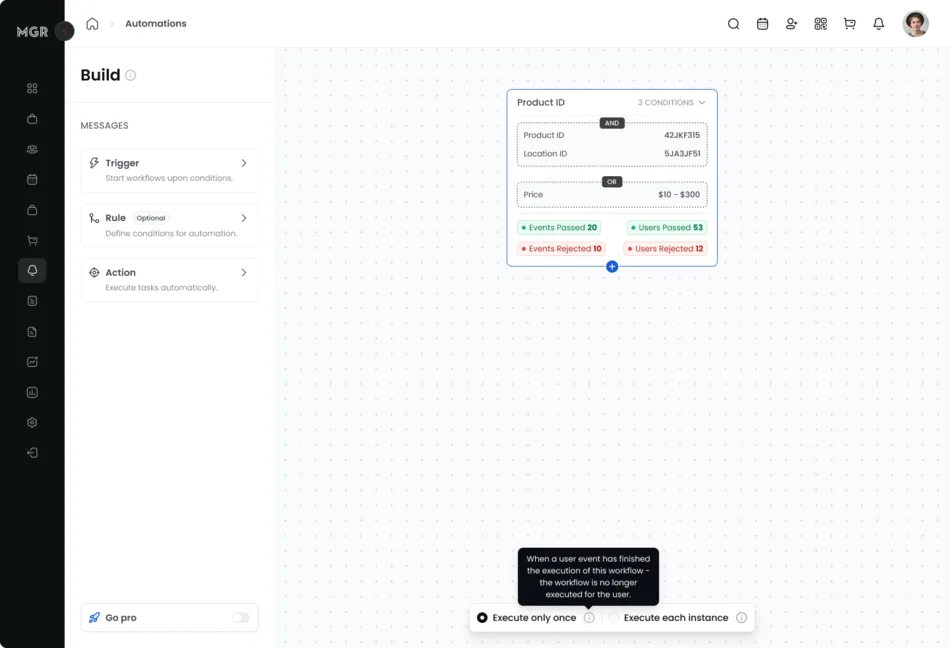
Two of the fifteen condition fields are aggregates over the member’s history rather than profile attributes. One counts bookings, with filters for period, class, instructor, state and location. The other sums or counts completed orders, with filters for period, purchase type, state and location. These resolve to a relation that the filters compose onto before the aggregate runs — so “spent more than $1,000 on memberships at the downtown location in the last six months” is one SQL query, not a Ruby loop over a member’s order history. There is also a geospatial operator computing distance between the member’s geocoded address and a studio location, which is how “clients living within five miles” gets automated.
Time
Three mechanisms, all on Sidekiq’s perform_at and a dedicated queue: a delay rule, a maximum wait on a trigger, and a maximum wait on an action. Delays and trigger waits anchor to a business timestamp on the triggering record, in either direction. Anchors are whitelisted per trigger type — a class booking exposes its start time, sign-in time, cancellation time and early-cancel deadline — and read through a respond_to? check, so an admin can say “12 hours before the class starts” without being able to name an arbitrary method.
The action wait is the most interesting, because it closes a loop all the way out to the email provider and back. A workflow step links to the notification it sent, so a journey can branch on whether the member opened the email — and it does that from both directions. SendGrid and OneSignal delivery webhooks fire on open and click, which resumes the parked journey immediately. If nobody opens anything, the timer expires and the journey takes the failure edge instead. “Wait three days; if they never opened it, try SMS” is therefore a workflow an admin can draw, and the engagement signal comes from the provider rather than from anything the platform has to infer.
Actions
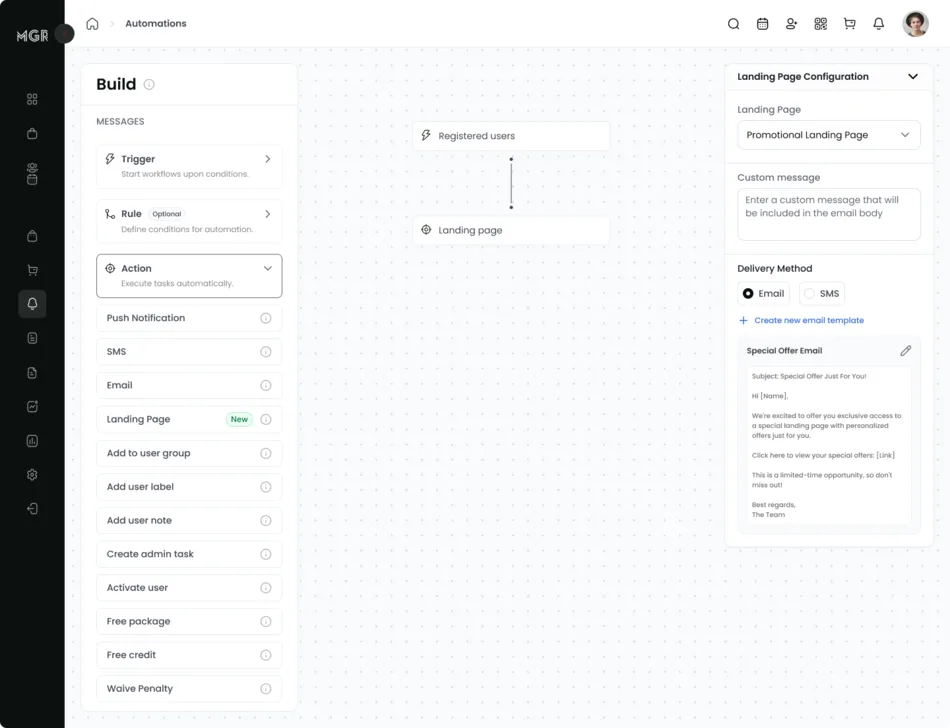
A number worth stating plainly, because it is the honest shape of the thing: the action taxonomy declares fifteen types and seven of them are actually wired — email, SMS, push, landing page, add-to-group, add-note and trigger-another-workflow. Two more are explicit stubs and six are empty subclasses that fail closed, moving the journey to an error state rather than silently continuing. The seven that exist are the seven studios asked for, and the placeholders are a roadmap that leaked into a constant.
Admin control over a running journey
Studios can pause and resume an individual member’s journey, recorded as an intervention. Every step type opens with the same halt check, so a pause takes effect at the next step boundary regardless of which kind of step is next, and resume is guarded against double-advancing a journey that already moved. Workflows themselves are never deleted, only deactivated with attribution of who and when, so history survives.
Shape of the code
Ten tables, all UUID keys and timestamptz timestamps, arriving as eleven additive migrations. Fifteen models plus thirty-three subclasses. Twenty-five commands, of which eleven exist purely to edit the step graph from the visual builder, including moving a step and removing an entire subtree. Five workers, four controllers and seven serializers.
47 spec files, covering all four rule semantics individually, the dispatcher, the global subscriber, and a 2,900-line end-to-end journey suite added during the hardening pass.
How we worked
This landed in two phases across the API and the admin app, as small reviewable pull requests against a live product. The first phase, September to November 2024, built the substrate: the event log, the step graph, the tree-editing API, then the journey state machine with its error and completion states. Idempotency and admin interventions came in January 2025 — both learned from watching the thing run. A second phase from April to June 2025 broadened triggers, conditions and actions, and wired workflows into landing pages later that year. It went to customers in December 2025, and January 2026 was spent on edge cases and the end-to-end test suite, plus a maintenance task to repair condition values that had been stored with the wrong type.
Nothing needed a cutover: every migration was additive, and a workflow only affects members once a studio explicitly activates it. We wrote the admin documentation alongside the feature — six reference documents covering triggers, rules, actions, step management and worked recipes — and the recipes turned out to matter more than expected, because the no-show pattern is only obvious once someone writes it down.
Results
| Metric | Before | After |
|---|---|---|
| Business events a studio can automate on | 0 | 14 trigger types, usable at the start of a workflow or mid-flow |
| Things an automation can do | 0 | 7 action types wired, of a 15-type taxonomy |
| Flow control | None | 4 rule types — split, match, reject, delay — nesting arbitrarily |
| Member attributes usable in conditions | — | 15, including 2 historical aggregates and 1 geospatial |
| Engineering involvement per new studio automation | One build request | None — studios self-serve |
| Automations composable beyond the shipped trigger list | — | Yes — the no-show follow-up is assembled from primitives |
| Live member journeys an admin can pause individually | — | Any, at the next step boundary |
| Workflows deleted, losing their history | — | None — deactivation is soft and attributed |
| Test coverage | — | 47 spec files, including an end-to-end journey suite |
The qualitative result is the one worth reading. The engine is fourteen triggers, four rules and seven actions — a genuinely small vocabulary. Studios used it to build automations nobody specified: class milestone celebrations at 25, 50 and 100 visits using an aggregate count; fourteen-day inactivity win-backs using a delay plus a zero-count condition over a rolling window; and no-show follow-ups synthesised from a booking trigger, a delay and a timed wait on attendance. That is the test of a primitive set, and it is the argument for building the automation layer inside the system of record rather than bolting on a tool that cannot see a class.
What’s next: describing a workflow instead of drawing it
The visual builder solved authorship, not fluency. A studio owner who can picture the automation they want still has to translate it into triggers, rules and edges — and the no-show recipe is proof of how much that translation can cost, since it took a support document to make an obvious idea discoverable. The next phase, now being planned, is an AI builder: describe the automation in plain language and get a working workflow on the canvas to review and adjust.
The interesting part is how little of this is new work, because the engine was built in a shape a model can safely write into. A workflow is already a graph of typed nodes whose conditions are already a closed, machine-checkable schema — fields whitelisted per step type, operators whitelisted per field type, filters checked against a declared list, all validated on write. That is exactly the contract we needed for the AI notification templates on this same platform: define valid in code, let the model propose, reject and re-prompt on anything that fails. Review is free too, because a workflow does nothing to a member until an admin explicitly activates it. The inactive state is the drafts table we would otherwise have had to build.
Two things become prerequisites rather than nice-to-haves. The missing depth limit on chained workflows matters much more when a model is composing chains than when a human is drawing them. And this is the case where we would build the eval harness we argued against for template generation — a generated design is judged by a human looking at it, but generated logic executes against paying members, so correctness needs to be measurable before anyone trusts it.
If this sounds like your system
If you are building customer-authored automation, the first question is not which rules engine to use — it is which events your customers actually care about, and whether anything outside your database can see them. If the answer is no, the automation layer belongs in your product, and a generic tool will never close the gap no matter how good its UI is.
Then keep the vocabulary small and make the primitives compose. Fourteen triggers that can appear mid-flow are worth more than fifty that can only start a workflow, because the first set can express business events you never thought of and the second cannot. And treat user-authored logic as data: whitelist fields and operators, validate on write, never interpret. The safety argument for our engine fits in a paragraph precisely because there is no interpreter in it.
Finally, assume you cannot cancel anything you schedule. Long-running journeys will outlive the state they were queued against, so make every timer check whether the world still looks the way it did when it was set. That one pattern removed an entire category of bug.
This is the kind of work our web and mobile application and technology consulting teams do, and it is a pattern we see across workflow automation and fitness industry products alike.
Tech stack
Backend
- Ruby 3.3
- Rails 7.1 (API)
- Puma
- Command-object service layer
Frontend
- Next.js 15.3
- React 19
- TypeScript 5
- MobX 6
- Tailwind CSS 4
- Radix UI
Data
- PostgreSQL 16
- JSONB conditions
- UUID keys
- Elasticsearch
Events
- Rails Event Store
- Global, per-user and per-tenant streams
Async
- Sidekiq 7.3
- Dedicated workflows queue
- perform_at timers
Integrations
- SendGrid
- Twilio
- OneSignal
- Stripe
Observability
- Sentry
- New Relic
- PgHero
- Per-request query counting
Infrastructure
- Docker Compose
- Capistrano
- GitHub Actions
- Playwright
Frequently asked questions
Should we build workflow automation into our product or integrate a marketing tool?
It depends entirely on whether the events that matter are visible outside your database. If your customers want to automate on “signed up” and “paid”, integrate. If they want to automate on events specific to your domain — a class attended, a credit redeemed, a payment retried, a booking cancelled inside the refund window — no external tool can see those, and the automation engine has to live where the events do.
How do you safely evaluate user-authored conditions on the server?
Treat the logic as data, never as code. Ours is JSONB: nested and/or trees of field, operator and value. Field names are whitelisted per step type, operators are whitelisted per field type, aggregate functions are a closed set, and every filter name is checked against the field’s declared filters. Validation runs on save, so a bad workflow is rejected in the builder rather than failing at 3am against a live member. There is no eval and no dynamic dispatch on user input anywhere in the evaluator.
How do you model a workflow so it supports branching and waiting?
A step is a graph node with a polymorphic payload and two edges, success and failure. Triggers, rules and actions are all payloads implementing the same interface, so branching is a node property rather than a special case, and the engine that walks the graph does not need to know what kind of step it is executing. Adding a new action type is a new subclass and no engine change.
How do you implement a workflow step that waits 7 days and checks if the customer came back?
Allow a trigger to appear mid-workflow. When the journey reaches a trigger that is not the event being processed, it parks, and the dispatcher’s query for candidate workflows includes journeys parked on the incoming trigger — so the same code path that starts workflows also resumes them. Attach a maximum wait and the journey takes the failure edge when the window expires, which is how “they did not come back” becomes an automatable event.
How do you handle delayed background jobs when you cannot cancel a scheduled job?
Do not try to cancel them; make them idempotent. Pass the scheduled job the step the journey was on when the timer was set, and have it no-op unless the journey is still sitting there and is neither completed nor terminated. A stale timer then costs one cheap database read. This is simpler and more robust than tracking job ids so you can revoke them.
How do you stop an automated workflow from firing twice for the same customer?
Two independent guards, both before any state is created. A join table records which domain events have entered which workflows, so the same event can never re-enter the same workflow. Separately, a one-time workflow refuses to run for a customer who already has a completed or terminated journey. Journey creation then happens inside a transaction.
Can workflow conditions reference a customer’s history, not just the triggering event?
Yes, and this is where most of the commercial value sits. Two of our fifteen condition fields are aggregates — counts of bookings and sums of revenue — each with filters for rolling time period, product type, location, staff member and state. They compile to a single filtered SQL aggregate, so “spent over $1,000 on memberships at this location in the last six months” is a condition an admin builds in a dropdown.
How long does it take to build a workflow automation engine?
Ours was two phases over roughly nine months on an existing Rails codebase, and the split is instructive: the first phase was almost entirely substrate — an event log, a step graph, a journey state machine — with very few triggers or actions. Breadth is cheap once the engine is right, which is why the second phase added most of the trigger and action types. Budget for the engine, not the catalogue.
Have a system that looks like this?
Bring us the part you have been putting off — the wide surface of manual configuration nobody finishes, the AI feature you are not sure how to make safe, the legacy job that keeps failing. We will tell you what we would build and what we would leave alone.