
An in-app CMS whose components know what they sell
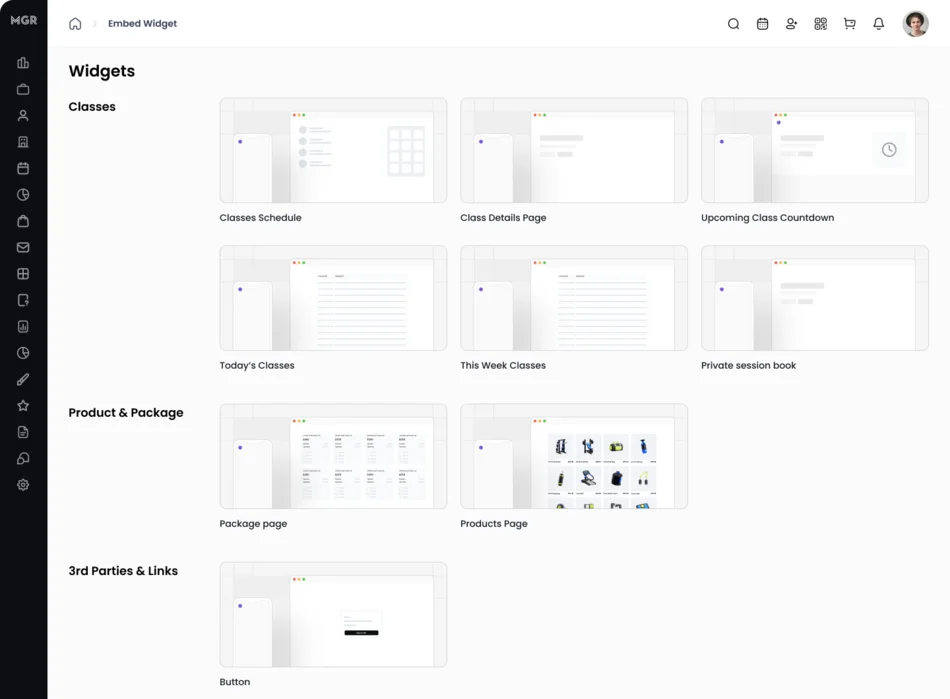
Studios sell through the platform but market on their own websites, and the bridge between the two was an unstyled iframe of the entire class schedule. We built the content layer into the product instead: a component catalogue, an offer-page builder with live preview, and an embed runtime that puts a brand-matched button in the studio’s DOM while the checkout stays in a sandbox.
- 2
- lines of HTML, and no API key
- 795
- lines of embed runtime, zero dependencies
- 160
- lines of appearance validation, not a CSS box
- 3
- ways to ship one offer from one definition
The client and the context
The platform runs booking, memberships, payments, scheduling and reporting for independent fitness and wellness studios, each on its own subdomain in a shared multi-tenant Rails API. Studios are small businesses. They have a website they are proud of — usually Squarespace, Framer, Wix or WordPress — and they do not have a developer on staff.
Which creates the problem this case study is about. The studio’s brand lives on their website. The studio’s commerce lives on the platform. Getting a visitor from the first to the second is the single most commercially important journey in the product, and for years it was the ugliest.
This is the fourth write-up from this platform, alongside the workflow automation engine, the AI notification template generator and the agentic assistant. It is the one that made the others reachable from a studio’s own homepage.
The problem
The platform already had an embed script, shipped in 2020 and still in production today. It worked like this: put a container element on your page, and the whole schedule — or the whole store — appears inside an iframe that resizes itself to fit. It did what it was built to do.
But it was all or nothing. A studio who wanted to promote one thing — a five-class intro pack, a gift card for the holidays — had two options. Drop the entire class schedule into their landing page and hope the visitor found the right product. Or link out, sending a warm visitor to a different domain with a different look, and lose the ones who bounced at the seam.
There was no styling control either. An iframe cannot inherit the host page’s typography, and it should not — but that means the embedded block always looked like a foreign object sitting inside a carefully designed site. Studios noticed. Some of them simply refused to use it.
What they wanted was narrower and harder: put my specific offer, styled like my site, on my page.
Why the CMS had to live inside the product
Read that requirement again and it is a content management problem: someone non-technical needs to compose something, see what it will look like, and publish it. The obvious move is to reach for a CMS — headless or otherwise — and wire it up.
We built the content layer into the product instead, and the reason is the difference between content and commerce.
A general-purpose CMS models content as blocks: a heading, an image, a rich-text body. That model is deliberately ignorant of what the content means, which is exactly what makes it reusable across every industry — and exactly what makes it useless here. An external CMS can store the words on an offer page. It cannot know that the offer is a ten-class package priced at $180, that it is restricted to first-time customers, that only fifty redemptions remain, that it should stop selling on Sunday, or that a purchase forty minutes later belongs to the page that produced it. Those facts live in the purchase ledger, and the ledger is not reachable from outside.
So the content types here are the product’s own objects. A component is not markup that happens to describe a class schedule — it is the class schedule, reading from the same tables the studio’s staff work in all day. An offer page is not a page with a buy button on it; it is a sellable offer with a funnel attached.
This is the same argument that justified building the workflow engine in-house rather than integrating a marketing tool. A tool bolted on from outside cannot see that a member booked a class, redeemed a package or failed a payment. Here it cannot see who is eligible to buy.
Why this was hard
- You are a guest in a hostile stylesheet. Code that renders into a page you do not control inherits CSS you have never seen. A
.buttonrule in the studio’s theme, a global box-sizing reset, a framework that setsoverflow: hiddenon everything — all of it applies to you. And you cannot simply retreat into an iframe, because the entire point is to not look like one. - Inline styles cannot express
:hover. This sounds like trivia. It dictates the architecture. If a studio can configure a hover colour — and a button that does not respond to the cursor reads as broken — then you cannot render with astyleattribute. You have to generate a real stylesheet, at runtime, inside a document that already has one, without colliding with it. - A public endpoint on someone else’s domain still has to know which tenant it is. The visitor is anonymous. There is no session, no token, no login. The request arrives from a domain the platform does not own, and it has to resolve to exactly one of hundreds of tenants — and to no other.
- Website builders disagree with each other about basic facts. More on this in the deep dive; it is our favourite thing in the codebase.
Our approach
1. A closed vocabulary, not a CSS box
The obvious way to let studios control appearance is a custom-CSS text area. We did not build one. Roughly 160 lines of the offer-page model are appearance validation: an allowlist of seven permitted top-level keys, then a nested validator for each. Themes are named. Layouts are named. Button shapes are named. Colours must match a hex pattern. Font sizes must carry a unit. Anything outside the vocabulary is rejected with an error naming what is allowed.
The cost is that a studio cannot do something we did not anticipate. The benefit is that every possible configuration renders correctly, no configuration can break the page, and each layout value maps one-to-one onto the component that renders it. The vocabulary is closed on both sides of the wire.
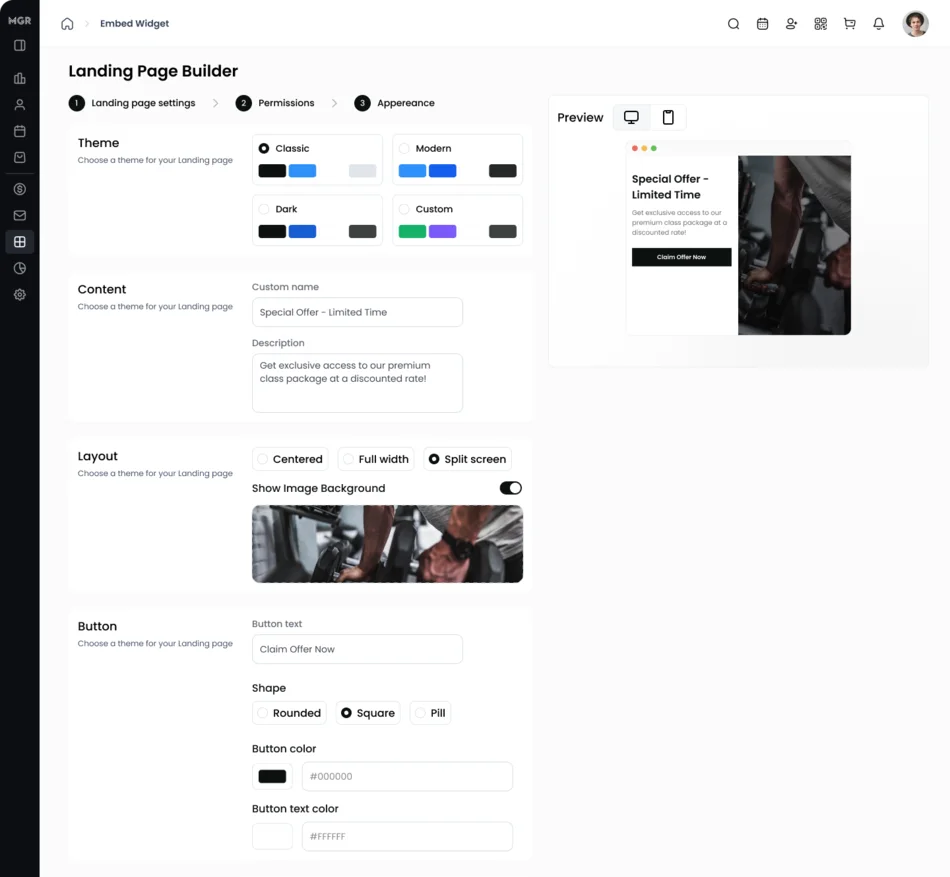
One small detail we are fond of, because it is what real systems look like after a year of live data: the button validator accepts both the current key name and an older one, with a comment saying why. The schema evolved; nobody got to run a migration over other people’s stored preferences.
2. Hover is an editing state, not a checkbox
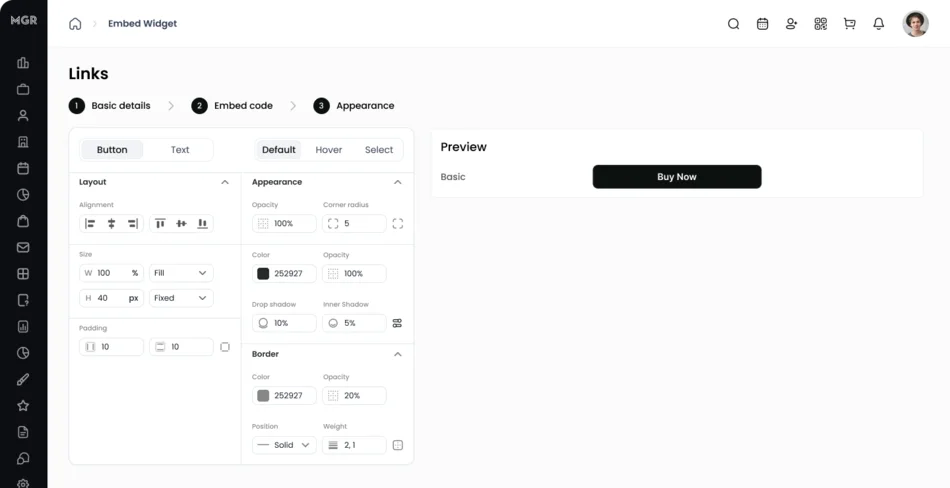
The widget editor presents Default, Hover and Select as sibling tabs, so configuring what the button does under the cursor is the same act as configuring what it looks like at rest. Every numeric field carries its own unit selector, and the preview beside the controls renders the finished component as you work.
That editor is where the schedule slipped, and it is worth being honest about where the difficulty actually was. The data model landed in the second week of March 2025 and the public endpoint went live in early April. Then almost two weeks went entirely into styling fidelity — margins, padding, dimension units, font families and their variants. Roughly a quarter of the admin code is font selection. The plumbing was days. Making a button convincingly belong to someone else’s page was the rest of it.
3. Split the boundary: inject the presentation, sandbox the transaction
The decision everything else follows from. The embed does two very different things, and they get two very different security postures.
The button is a real button element, created and inserted directly into the host page’s DOM, styled from the studio’s saved configuration. It is not in an iframe. It can be centred by the studio’s flexbox, sit inside their hero section, and use their font.
The checkout is an iframe. When the button is clicked, the loader opens a full-screen modal containing a frame pointed at the platform’s own origin, and login, card entry and payment happen entirely inside it. The studio’s website — and any script on it — cannot reach into that document.
Neither half would work as the other. An iframe for the button would never match the site. Direct DOM injection for the checkout would put card fields in a document the studio’s analytics tags can read.
4. Two lines of HTML, and nothing to leak
What the studio copies out of the admin console is deliberately boring: a container element carrying the component’s URL, and a script tag. There is no public key, no client token, nothing to rotate. Identity travels in the URL — the origin names the tenant, the path names the component. The loader finds every container on the page, so one script tag serves any number of components.
The two are presented as separate snippets with separate placement instructions, because they go in different places and that is the difference between working first time and opening a support ticket. Getting the snippet is the last step of a guided flow rather than a developer task, and once a component is saved it can be copied again from its own options menu — because the person who needs it a second time is pasting into a page, not editing a component.
Decisions we made — and what we deliberately didn’t build
Scoped class names instead of Shadow DOM
Shadow DOM is the textbook answer to style isolation, and we did not use it. Shadow DOM isolates perfectly, which is the problem: it would also block the studio’s own fonts and inherited typography, and the goal was for the button to look native, not sealed.
Instead the runtime generates a stylesheet scoped by a class name derived from the component’s UUID and injects it once, guarding on an element id so repeated components and repeated script tags cannot duplicate it. Baseline rules carry !important — not something we would write in an application stylesheet, and exactly right here, because the host page’s CSS is unknown, arrived first, and is not going to defer to us. It is also the answer to the hover problem: a generated stylesheet can express a pseudo-class, and a style attribute cannot.
A deliberately public, deliberately thin endpoint
The component read endpoint is unauthenticated, on purpose. It has to be — an anonymous visitor on a third-party domain is the only caller that matters. So the response was cut to the bone: the component’s id, name, type, its style and config objects, and an optional image. No tenant identifiers, no product records, no counts, no timestamps.
When an endpoint is public, its serializer is the security boundary, and the smallest one that renders the component is the right one.
No custom CSS, no arbitrary HTML, no freeform page templates
Three things we were asked about and declined. Custom CSS, because a studio’s stylesheet mistake becomes our support ticket and our reputation on their site. Arbitrary HTML in offer page content, because the same fields feed emails and SMS through the notification template system, where the sanitisation rules differ. And freeform page templates, because the offer model is what makes eligibility and attribution possible, and a generic page builder would have thrown both away to sell a feature bullet.
Worth stating plainly what that means, so nobody arrives expecting the wrong product: there is no block-level authoring here, no section library, no page templating language and no content versioning. This is a CMS in the sense that non-technical people compose, preview and publish from it. It is not a website builder, and making it one would cost the thing that makes it valuable.
Architecture and implementation
Two lines of HTML on a page the platform does not own, and everything after them is about which side of a boundary each piece lands on.
- 1The snippet loadsA container element naming the component, and one script tag. No key, no token, nothing to rotate.
- 2The origin names the tenantMiddleware resolves the request origin to exactly one tenant before any controller runs — a platform subdomain, or a custom domain the studio registered themselves.
- 3The public read returns almost nothingName, type, style, config, optional image. The serializer is the security boundary, so it carries no tenant identifiers and no product data.
- 4Presentation crosses into their DOMA real button, a runtime-generated stylesheet scoped by UUID, their fonts, their layout. Injected once, guarded against duplication.
- 5The click opens a sandboxA modal containing a frame on the platform’s origin. Parent and frame coordinate over postMessage — height, scroll, close.
- 6The transaction never leaves itLogin, card entry and payment happen inside a document the host page cannot read, whatever else is running on it.
- 7The sale finds its way homeThe offer page is recorded as the source of the price adjustment on the order line item, so attribution sits in the ledger rather than beside it.
Engineering deep dive Origin-resolved tenancy, a CORS allowlist assembled from the database, a dependency-free loader, the iframe protocol, two website builders that contradict each other, and attribution across the anonymous boundary.
Tenancy is resolved before any controller runs
A middleware chain sets the tenant on the request environment. It reads the Origin header: if the host sits under the platform’s own domain, the leading label is the tenant slug; otherwise it falls through to the registered custom domain for that host. Every command then scopes through that account’s own collections, so a studio cannot edit their snippet into another tenant’s data. The identifier is the host, and the host is the thing that gets checked.
CORS is data, not configuration
The standard CORS gem is in the dependency list and switched off, because a static origin list cannot express this requirement. The allowlist is assembled from the database on demand: every tenant’s platform subdomain, every registered custom domain, and — the important one — the studio’s own whitelisted URLs from their account settings.
That is the mechanism behind “embed it on your website”. The studio types their marketing domain into settings; that domain becomes a permitted origin for their tenant. Self-service, no deploy, no support ticket.
Being precise about what this is: CORS is origin authorisation enforced by the browser. The middleware attaches headers after the request has run, and it is the browser that discards a response it was not permitted to read. It is the right tool for keeping other people’s pages from reading this tenant’s responses; it is not the thing standing between an attacker and the data. Tenancy scoping is.
The loader: 795 lines, zero dependencies
The embed runtime is one closure of vanilla JavaScript with no build step, served as a static file straight out of the Rails app. That was a constraint, not an aesthetic: this file loads on other people’s websites, alongside their bundler, their jQuery and their tag manager. Shipping a framework into that environment means shipping a version conflict.
It injects one shared stylesheet, scans for containers, fetches each component, renders a button or an image, injects the per-component hover rules, and binds the click. Fonts are handled by injecting a stylesheet link for web fonts and a font-face block for named variants — with dedupe guards on both, because a page with four components should not request the same font four times.
The iframe protocol
Once the modal is open, parent and frame talk over postMessage with four actions: announce the parent’s origin, report content height so the parent can resize, scroll to top, and close the modal.
The origin message is the interesting one, because it is not informational — it is how the embedded app checks its own embedding context. The parent announces the URL it is running on, and the app compares that against the studio’s whitelisted domains and refuses to render on an unauthorised parent, naming the offending domain rather than failing blank. The parent repeats the announcement on a short interval until acknowledged, because there is no reliable “the iframe is ready” event to wait for.
Worth being precise about what that is and is not. The parent supplies its own URL, so a determined embedder can lie about it. This is policy enforcement for honest actors and a genuinely useful diagnostic for a studio who pasted the snippet on the wrong site — not a security boundary. The real boundary is that the frame’s contents are same-origin to the platform and therefore unreadable from the host page, whatever the host page claims to be.
The height handler has a floor: anything under 150 pixels is treated as 250. That line is a fossil of a real field bug. A frame measured before layout reports a near-zero height, and without a floor the modal collapses to a sliver on exactly the slower connections you most want to work.
The best nine lines in the codebase
From the older whole-page embed script, and the most honest thing in the whole subsystem: a comment explaining that when the embed is nested inside another frame — as Framer does it — the page URL reads as about:srcdoc and you must reach for the parent frame to get the real one. And that on Squarespace, reaching for the parent throws a security error when it is cross-origin, so you must not.
Two website builders with directly contradictory requirements. The resolution is an ordered fallback — current URL, then parent, then the referrer — wrapped in a try/catch.
You do not write that from a specification. You write it after a studio on Squarespace reports a broken embed and a studio on Framer reports a different broken embed, and both are right. It is the clearest evidence we can offer that this was built against the platforms studios actually use, and it was last touched in March 2026, five and a half years after the first embed script was committed.
Attribution across the anonymous boundary
A conversion rate is only honest if the view and the purchase belong to the same person — and that person was anonymous when they arrived. The view tracker identifies guests with a client-supplied identifier, then retroactively reassigns those views to the account once the visitor authenticates, so a view before signup and a purchase after it land on the same funnel.
Deduplication runs on top, with the exclusion cases reasoned in comments rather than left implicit: staff previewing their own page are not a view, and an unidentifiable guest cannot be deduplicated at all. When a view is deduplicated the endpoint returns the existing record rather than an error, so the client always gets a stable identifier back.
The purchase side is recorded where it cannot drift: the offer page is stored as the polymorphic source of the price adjustment on the order line item. Attribution lives in the revenue ledger, not in a marketing counter kept alongside it.
One offer, three channels
A published offer is reachable by its own URL, sent as a step in a workflow automation, or delivered to a client segment as a campaign — the last two through the same notification template system the platform uses for every transactional message, with a merge tag for the page URL.
That is why we would describe this subsystem as infrastructure rather than a feature. The offer is defined once, with its eligibility rules and its funnel, and distributed three ways.
How we worked
The build split cleanly in two. The widget builder ran March to May 2025. The offer page builder ran October 2025 to January 2026, peaking in November. The embed runtime is still maintained; its most recent fix landed in March 2026.
The admin-side builder is a structured form over a style model rather than a drag-and-drop canvas — 34 files and around 3,400 lines — shaped as a three-step wizard: basic details, appearance, embed code. That was a deliberate choice over a canvas. A canvas promises freedom the renderer cannot honour, and a studio owner who can drag anything anywhere will eventually drag something into a state that does not survive a phone.
Results
The change is structural: a studio can now put a specific offer, styled to match their site, on their own page, and keep the transaction inside a boundary neither they nor we have to think about. The previous answer was an unstyled frame containing the entire schedule.
| Metric | Before | After |
|---|---|---|
| What a studio could place on their own site | The whole schedule or the whole store | One specific offer or component, styled to their brand |
| Styling control | None — a frame cannot inherit host typography | Named themes, layouts, shapes, colours, spacing and hover states |
| Getting the embed code | — | Last step of a guided flow, one-click copy, no developer |
| Authorising their own marketing domain | — | Self-service in settings; the allowlist is read from the database |
| Credentials to manage | — | None. Identity travels in the URL |
| Places one offer can be published | One | Three, from a single definition |
| Data on the public endpoint | — | Style and config only — no tenant or product records |
| Purchases attributed to the page that produced them | — | Recorded on the order line item. Components, not yet — see below |
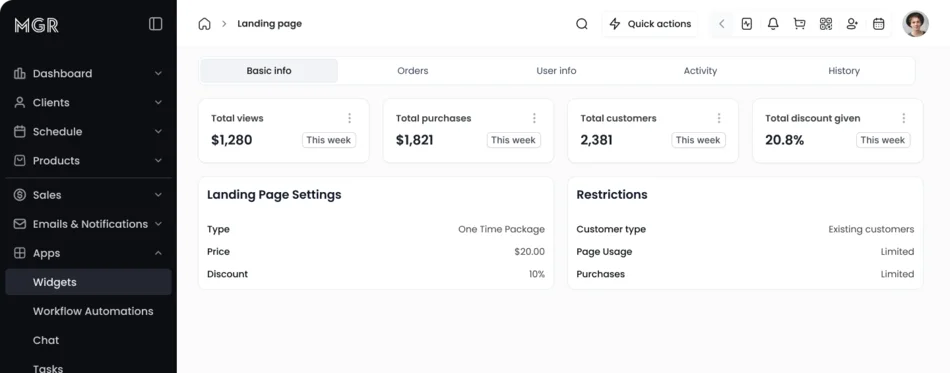
The commercial figures — studios with a component embedded, offer pages published, conversion rates, revenue attributed — are the client’s to publish rather than ours to estimate. What we can say is that the measurement was built alongside the feature rather than retrofitted: every published page carries its own view count, purchase count, customer count, discount total, revenue and conversion rate.
What we would fix next
The widget builder does not validate style on the server. The offer page model has a 160-line appearance allowlist; the widget model validates a name and accepts two free-form JSON blobs, and those values are interpolated into a stylesheet on the studio’s own website. The hex and unit patterns already exist one directory away. They should be reused. This is the honest counterweight to the validation we praised earlier — we did it properly on one side of the feature and not the other.
The style algorithm is implemented twice. Once in TypeScript for the admin’s live preview, once in JavaScript in the embed runtime. Two languages, two repositories, one algorithm — and they have already drifted slightly, since the preview omits the !important the runtime adds. A single generated stylesheet served from the API would collapse both into one.
The embed scripts have no tests, and the tests that exist cover the wrong caller. Nearly 900 lines of browser-critical JavaScript run on third-party websites with no harness at all. Meanwhile the component API has a request spec and five command specs — but every example in them runs as an authenticated staff member with a token. The endpoint whose entire purpose is to serve an anonymous visitor on someone else’s domain is exercised only as a logged-in staff request.
That distinction is worth dwelling on, because it is the more common failure. Absent tests are visible; tests that pass while never asking the question that matters are not. A headless browser test that loads a real snippet into a deliberately hostile stylesheet and asserts the button renders — as an anonymous visitor — is the highest-value test nobody has written.
Component-driven purchases are not attributed. Orders carry an offer page reference; there is no equivalent column for components, so once a visitor clicks through into the cart, a component purchase is indistinguishable from any other. Offer pages can report views, purchases and conversion rate; a component cannot answer the first question a studio will ask about the button on their homepage. It is a nullable column and a parameter threaded through the checkout flow — small work, and the highest-value thing missing.
What’s next
The extension seam is real and cheap to use, and it is the strongest argument for the architecture. A new component type needs a model subclass — no migration, because presentation and configuration are schema-free JSON on a single-table hierarchy — one line in the type mapping, a command namespace for writes, a render branch in the loader, and a configuration form. Everything else is type-agnostic: the public read path, the serializer, the snippet generator, the loader bootstrap, the CORS allowlist and the tenancy resolution do not change. The style component library in the admin console is type-agnostic too, so a new component inherits the whole appearance system — borders, shadows, spacing, typography, hover states — without new UI work.
Two things we would want in place first. Server-side style validation, so each new type does not inherit the same unvalidated payload. And a single source of truth for the style-to-CSS transform, so adding a type means changing one implementation instead of two.
If this sounds like your system
The pattern generalises well past fitness studios. If you run a multi-tenant product whose customers have their own websites, you will meet all of these: how much of your UI to inject versus sandbox, how to identify a tenant with no session, how to let customers authorise their own domains without a deploy, and how to tie an anonymous visit to a later purchase.
The transferable decisions are these. Build the content layer inside the product when your content types are commercial objects, because an external CMS cannot see your ledger. Split the boundary by risk rather than by convenience. Give customisation a closed vocabulary and validate it where the data enters, which is also what makes a live preview trustworthy. Keep the public payload as small as the renderer needs. And ship the embed runtime with no dependencies, because you do not control the page it lands on.
This is the kind of work our web and mobile application and platform consulting teams do, usually as one module of a product that also needs automation and applied AI to earn its keep.
Tech stack
Backend
- Ruby 3.3.9
- Rails 7.1 (API)
- Rack middleware
Frontend
- Next.js
- TypeScript
- MobX (admin)
- Zustand (consumer)
Embed runtime
- Dependency-free vanilla JavaScript
- No build step
- postMessage protocol
Data
- PostgreSQL 16
- JSONB style and config
- Single-table inheritance
- Polymorphic attribution
Tenancy
- Origin-resolved middleware
- Per-tenant CORS assembled from the database
- Customer-registered domains
Async
- Redis
- Sidekiq
- Elasticsearch via Searchkick
Frequently asked questions
What is an in-app CMS, and why build one instead of integrating a headless CMS?
An in-app CMS is content management that lives inside the product it publishes from, so its content types are the product’s own objects rather than generic blocks. That is the whole reason to build rather than integrate: a headless CMS can store the words on an offer page, but it cannot know that the offer is a ten-class package, that it is restricted to first-time customers, that only fifty redemptions remain, or that a purchase should be attributed back to the page that produced it. Those facts live in the purchase ledger, and the ledger is not something an external CMS can reach.
Can customers write their own CSS or HTML?
No, and that is a considered position rather than a limitation waiting to be removed. Appearance is a validated allowlist — named themes and layouts, button shapes, hex colours, unit-bearing font sizes — checked on the server before anything is stored. Every valid configuration renders correctly, and no configuration can break the page. Arbitrary HTML is refused for a second reason: the same content fields feed email and SMS through the notification system, where the sanitisation rules are different.
How does a live preview stay faithful to what actually renders?
By closing the vocabulary on both sides of the wire. Because appearance is a fixed set of named values rather than free-form CSS, each layout value maps one-to-one onto the component that renders it, so the preview and the published page are drawing from the same finite set of states. We will be honest about the limit: the style-to-CSS transform is currently implemented twice, once in TypeScript for the preview and once in JavaScript in the embed runtime, and the two have already drifted slightly. Serving one generated stylesheet from the API is the fix, and it is on our list rather than done.
Why not put the whole embed in an iframe? It is simpler and safer.
It is, and it is what the previous generation did. The reason it was not enough is that an iframe cannot inherit the host page’s typography or be laid out by the host page’s CSS, so it always reads as a foreign object. When the goal is a call-to-action that belongs in a customer’s hero section, the isolation you want around a checkout is exactly the wrong property around a button. So we split the boundary by risk: presentation is injected into the host DOM, and the transaction stays sandboxed.
Why not Shadow DOM for style isolation?
Same reason. Shadow DOM isolates perfectly, including from the customer’s own fonts and inherited typography, and we wanted native-looking rather than sealed. Scoping is by a class name derived from the component’s UUID instead, with baseline rules carrying !important — not something we would write in an application stylesheet, and exactly right when the host page’s CSS is unknown, arrived first, and is not going to defer to you.
How does an embed know which tenant it belongs to without an API key?
The tenant is a property of the URL in the snippet. Middleware resolves it from the request origin — a platform subdomain or a registered custom domain — before any controller runs, and every query is scoped to that tenant. There is no client token to leak or rotate, and a customer cannot edit their snippet into another tenant’s data, because the identifier is the host and the host is what gets checked.
How do you let customers authorise their own domains without a deploy?
By treating the CORS allowlist as data rather than configuration. The standard gem is installed and switched off, because a static origin list cannot express “every tenant’s subdomain, every registered custom domain, and whatever marketing domain each customer typed into their own settings”. The allowlist is assembled from the database per request, so a customer adds their website in settings and it works — no deploy, no support ticket.
How is conversion measured when visitors are anonymous when they arrive?
Guests are tracked with a client-supplied identifier, and their views are retroactively reassigned to their account the moment they authenticate, so a view before signup and a purchase after it land on the same funnel. The purchase side is recorded where it cannot drift: the page is stored as the source of the price adjustment on the order line item, so attribution lives in the ledger rather than in a marketing counter kept alongside it.
Does it work on Squarespace, Wix, Framer and WordPress?
Squarespace and Framer are handled explicitly in the code, including a fallback chain for the case where the two platforms’ requirements directly contradict each other — Framer nests the embed so the page URL must be read from the parent frame, while Squarespace throws a security error if you touch the parent at all. The runtime ships with no dependencies for the same reason: it lands on pages that already have a bundler, a tag manager and someone else’s jQuery.
Have a system that looks like this?
Bring us the part you have been putting off — the wide surface of manual configuration nobody finishes, the AI feature you are not sure how to make safe, the legacy job that keeps failing. We will tell you what we would build and what we would leave alone.