
Branding 114 notification templates in under 30 minutes
A fitness studio management platform shipped 114 system notification templates per customer — and almost nobody branded them, because doing it by hand meant opening the editor 82 times. We built an AI layer that generates a branded layout, adapts every notification into it, and puts a human in front of each draft before anything goes live.
- 114
- templates branded per studio
- <30 min
- to configure the full set
- 76
- curated layouts to start from
- 100%
- human-reviewed before it goes live
The client and the context
Our client operates a multi-tenant platform that runs the operational back office for fitness and wellness studios: scheduling, bookings and waitlists, packages, payments, retail, reviews and staff management. Each studio gets its own tenant inside a shared PostgreSQL database, and the platform sends messages on that studio’s behalf to that studio’s members — booking confirmations, class cancellations, payment failures, package expiry reminders, review requests.
The messaging surface had grown with the product for eight years. By 2026 every new tenant was seeded with 114 system notification templates — 82 email, 20 SMS, 12 push — spanning 12 product areas and drawing on 166 documented merge tags — the same system that later carried offer pages out to client segments and the review requests that only go to members who checked in. That breadth was a genuine product strength. It was also the thing studios quietly gave up on.
The problem
A studio owner who has just signed up wants their emails to look like their brand: their logo, their colours, their tone, their footer. To get that they had to open the notification editor and edit templates one at a time — 82 of them for email alone — each with its own subject, body and merge tags, and no way to say “apply this look to all of them.”
Most never finished. Their members kept receiving messages that either looked like the platform rather than the studio, or looked inconsistent because the owner had branded the six emails they cared about and abandoned the rest. Meanwhile the notification template manager had become the third most-churned application file in the repository over eighteen months — behind only the tenant model and the user model — and every support conversation about branding landed back on the engineering team.
Why this was hard
- Two documents, not one. Every email is a layout (branded shell, one content slot) rendered around a notification (the per-event body, full of Handlebars merge tags). Generating either alone is easy; generating both so they compose correctly at send time, across 82 events, is not.
- Merge tags cannot be hallucinated.
{{user_profile.first_name}}must survive generation as a literal token. A model that helpfully writes Hi Sarah has silently broken every future send of that template, for every member. - An email layout is reused by strangers. The same shell wraps a booking confirmation to one member and a payment failure to another, so any greeting in the shell addresses the wrong person — invisible in a preview, obvious in production.
- Email HTML is a hostile target. Table-based layout, inline CSS only, no
<script>or<style>, and a legacy editor downstream that breaks on raw newlines in stored HTML. - It runs on live tenants, sending real transactional mail — so nothing could overwrite a studio’s live notifications on the strength of a first draft.
- Provider rate limits. Fanning 82 generation jobs out at the platform’s normal Sidekiq concurrency of 15 would trip the LLM provider before one studio’s rollout finished.
Our approach
1. Separate the shell from the content, and generate each against its own contract
One builder produces the branded shell — logo header, signature footer, brand palette, exactly one {{DYNAMIC_TEMPLATE_CONTENT}} slot. A second produces the content that drops into that slot, with a per-template merge-tag catalogue injected into the prompt so the model can only reach for tags that actually resolve for that event. Each validates independently.
2. Make the output structurally verifiable, and repair it in a loop
Rather than hoping for good output we defined “valid” in code — full HTML document, table-based, inline CSS only, no scripts, exactly one content slot, no personalised greeting, no invented image URLs — and wired a bounded repair loop that re-prompts the model with the specific rejection reason, up to three attempts. Most failure classes fix themselves on the second pass without a human seeing them.
3. “Apply to all” as a reviewable batch, not a bulk update
What studios wanted was one button: take this layout, put every notification into it. We built it as a rollout — a tracked run that fans out one generation job per template, writes each result as a draft, and changes nothing live. When the run is ready the admin gets an email with a deep link and applies the drafts they want. Partial application is first-class: apply eleven now, finish tomorrow.
4. Give the model taste to borrow from
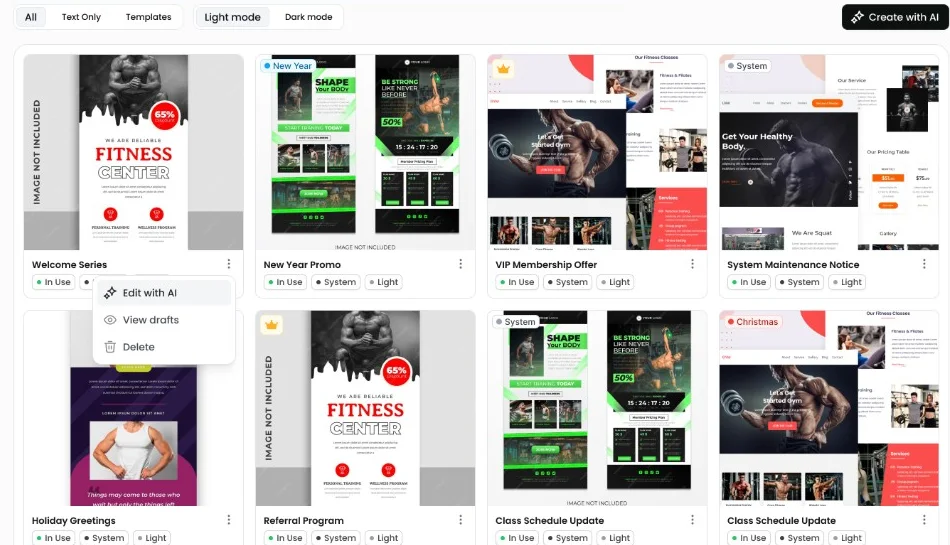
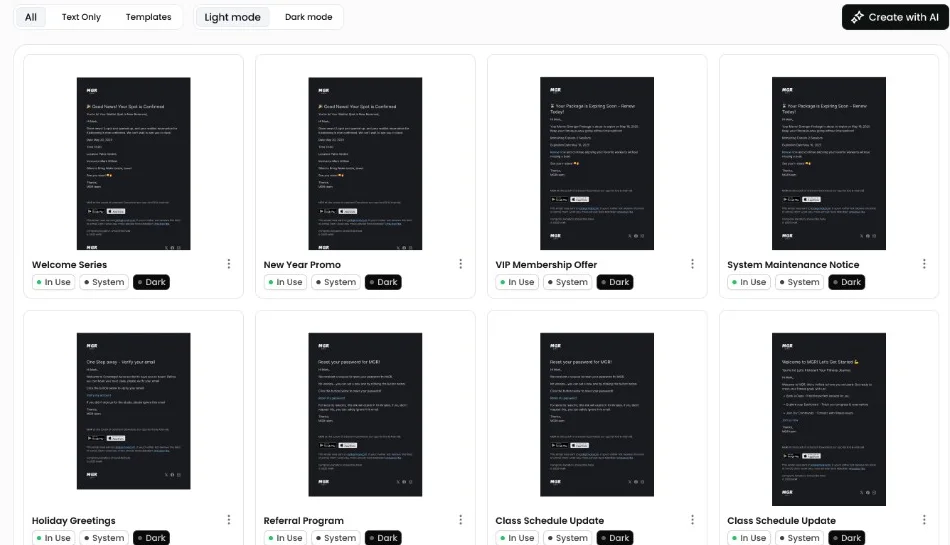
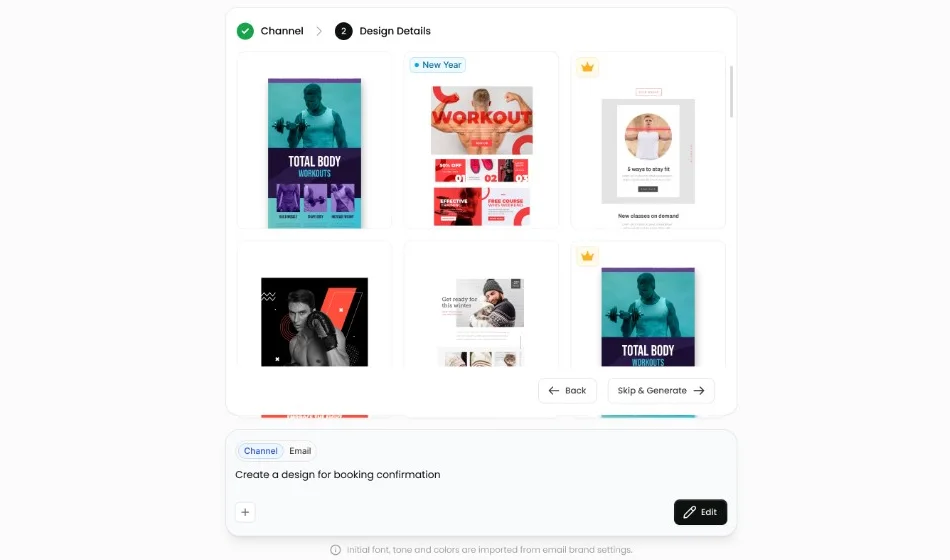
We hand-built a curated library of 76 email layouts — 38 designs in light and dark — tagged with 18 style words. The default flow is select-then-customize: pick the closest curated base, then restyle it to the studio’s brand. It is far more reliable than designing from scratch, and it puts the floor on output quality at a designer’s work rather than a model’s.
5. Put the whole thing behind four questions
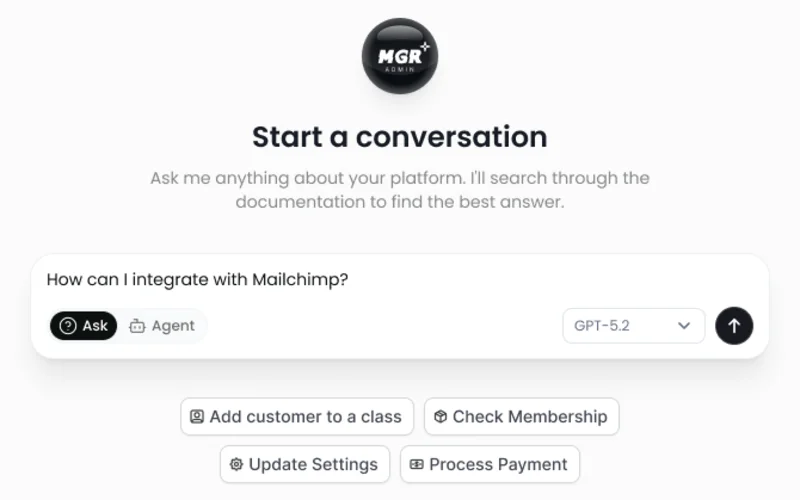
None of the above matters if the admin still faces a blank prompt box. In the admin app the feature is a four-step wizard — channel, starting point, design details, preview and refine — that never asks the studio owner to think about layouts versus content, merge tags or rollouts.
Ninety per cent of the product’s surface area sits in the last step, where the generated email renders beside a refine panel offering three ways to change it: describe it in words, adjust the palette, or swap the fonts. Refining is the same generate-validate-repair path as the first draft, so the guardrails apply to the twentieth iteration as much as the first.
Decisions we made — and what we deliberately didn’t build
Deterministic base-layout selection, not an LLM re-ranker. The first version asked a model to rank curated layouts against the user’s brief. We deleted it. Selection is now scope by channel and theme, filter by style-tag overlap, pick at random from what matches — no cost, no latency, no failure mode, and users get variety instead of always converging on the same base. The now-unused client argument still sits in the selector’s signature as the scar.
Model routing by job, not one model everywhere. Restyling a layout and adapting content in bulk run on the smaller model; writing a single notification’s copy from scratch runs on the larger one. The bulk path is the one that multiplies by 82, so it gets the cheap model — and can afford to, because it is editing a curated design rather than inventing one.
Mandatory human review, not auto-apply. It would have been a shorter demo to have “apply to all” write straight to the live templates. We were not willing to put unreviewed model output in front of a studio’s paying members, and the drafts table meant we did not have to trade speed for safety.
We deliberately did not build an eval harness. Where every output is reviewed by a human before it ships, an offline eval set scoring subjective design quality would have cost a week and gated nothing. We spent that week on the validator and the repair loop instead — the failures that matter here are malformed, not mediocre, and malformed is machine-checkable. If the roadmap moves toward auto-applying drafts, the eval harness becomes the prerequisite and we would build it then. It is also the answer we give ourselves when the same question comes up for generating workflow automations on this platform, where the output is logic rather than design and a human reading it is not enough.
Architecture and implementation
A rollout begins with a single call and ends with a set of drafts waiting for a human. Nothing in between touches a live template.
- 1Start rolloutClone the chosen layout into the tenant, resolve the target set — system-generated, enabled, matching channel, minus eleven inactive legacy slugs — and record the run.
- 2Fan outOne job per template inside a Sidekiq batch on a dedicated queue, with LLM concurrency capped at three.
- 3GenerateResolve that template’s merge-tag catalogue, prompt the model, then validate: one content slot, table-based HTML, no script or style, no greeting, no invented image source.
- 4RepairInvalid output is re-prompted with the specific rejection reason, up to three attempts, before anything is persisted.
- 5Persist as draftResolve image and icon slots, write a draft row, increment the run’s counters, broadcast progress to the admin UI.
- 6Human reviewWhen the run completes the initiating staff member is emailed a deep link. They apply the drafts they want, individually or in bulk.
- 7ApplyEach apply is transactional and snapshots the current live content first, so every template gains its own rollback point.
Engineering deep dive Data model, concurrency and failure handling, integration boundaries, observability and testing — the detail behind the diagram.
The admin surface
The client is a separate Next.js 15 App Router application on React 19, with MobX stores wrapping an axios client — no server-side rendering of tenant data, no React Query, one store per resource. The AI feature adds four route trees and two wizards that share a step shell, roughly 1,400 lines of page code over 5,500 lines of notification components.
Two details are worth naming. The preview renders against a server endpoint that supplies plausible dummy values for every merge tag, so an admin sees a realistic email without the app ever loading a real member’s record into a design tool. And progress on a rollout arrives by server-sent events: a single stream connection per session fans update messages into an in-app pub/sub, and the bulk-run model subscribes to its own updates in its constructor. No polling, no per-run socket.
Worth being precise about what is not streamed: single-template generation is a plain synchronous request, and the stepped progress the user sees during it is a client-side timer, not server truth. Only the bulk path reports real counts.
Data model
Drafts are the load-bearing idea. A draft row carries a status (draft, finalized, discarded, superseded), a source (ai_generated or live_snapshot), a version integer, the generated subject and bodies, a merge-tag-free preview, a JSONB snapshot of exactly which model, tone and base produced it, and a nullable bulk-run reference.
Two things fall out of that shape. First, finalizing a draft writes a live_snapshot row at the next version capturing the current live content before overwriting it — so every apply creates its own per-template rollback point for free. Second, a unique partial index on the bulk-run and template pair makes duplicate generation impossible at the database level rather than by convention, which is what lets the workers retry safely.
Concurrency and failure
LLM generation is capped at three concurrent jobs, independent of the queue’s own concurrency of 15, so an 82-template rollout paces itself under the provider’s rate limit instead of being throttled by it. Workers retry three times. Three failure modes cost real debugging:
The batch completion callback cannot decide when a run is finished. It fires when every job has run once, counting a job that raised as done while the queue is still scheduling its retry. Trusting it marked runs complete with templates missing. Completion is now derived from the run’s own arithmetic — completed plus failed at least equal to the total — checked by whichever worker lands last, with the batch callback demoted to scheduling a 30-minute backstop sweep sized to outlast the retry budget. The sweep force-finishes a run only if a template never reported back at all, and logs the exact counts when it does.
Cancellation races generation. Every worker checks a halt flag before doing LLM work, and we separate two stop semantics users conflate: cancelled stops generating but keeps the drafts already produced, because stopping a run is not a decision to throw away finished work; discarded deletes them. The batch callback hard-sweeps any draft created in the window between a worker passing its halt check and a discard committing.
A template deleted between fan-out and execution is charged to the failed count rather than leaving the run permanently one short of finishing.
Integration boundaries
The model is never allowed to emit a real image URL, because the ones it invents 404. It emits placeholder slots carrying keyword or icon hints, and the server resolves them afterwards against the Unsplash API and an icon CDN — sized to the slot, with a neutral fallback for unknown icons and a themed placeholder when no Unsplash key is configured, so previews always render and local development needs no third-party credentials. Anything else in an image source fails validation and feeds the repair loop.
The greeting bug
The most instructive failure in the feature: models kept writing Hi {{user_profile.first_name}} into the reusable shell. It previews perfectly and is wrong in production, because that same shell wraps the payment-failure email to a different member. We built a detector, made it a validation failure so the repair loop handles it, and — because the customize and refine flows faithfully preserve their input — also inject a pre-emptive instruction to strip a greeting already present in the base. Getting it right at all three layers took two attempts.
Observability, and a gap we will own
The platform’s conversational AI is fully traced to Langfuse — eight runner callbacks capturing input, output, model and per-call token counts, tagged by environment and carrying tenant metadata. Template generation is not, because the builders call the LLM client directly rather than through the instrumented agent runner.
What a rollout records instead is the model and parameters that produced each draft, stored on the draft itself, which is enough to reproduce a bad output but not enough to answer “what did that rollout cost.” Extending the tracing to the builders is the next thing on this feature’s list, and it is the prerequisite for any per-tenant cost reporting.
Testing
The LLM client is a deliberately thin seam so every builder is unit-tested against a fake with no network, and the builder refuses to override an injected client’s temperature so tests stay deterministic. Seven focused unit specs cover the parts where correctness is objective — greeting detection, style profiles, library selection, icon and image resolution — plus flow specs for the draft, design and rollout paths, inside a suite of 1,013 spec files gated in CI on every pull request. What we do not test is whether a generated design is good; that is what human review is for.
How we worked
This landed across two repositories as a sequence of small, reviewable pull requests against a live product — each one shippable on its own. First the grouping and classification metadata that made a “target set” expressible, then drafts, then single-template generation, then the bulk rollout, then a fortnight of sharpening against real usage: theme consistency, SMS layouts, the greeting fix, refine stability.
The schema arrived as additive migrations with column comments explaining intent, so nothing needed a cutover and nothing needed a rollback plan beyond “don’t apply the drafts.” Not everything landed first time: the WYSIWYG editor underneath the preview pane was swapped in the last week of the workstream, because the incumbent kept mangling the table-based HTML the validator had just insisted on.
We wrote the admin documentation as we went — five reference documents including a full 114-notification catalogue and a 166-tag merge-tag reference — which the product’s own support agent now reads to answer studio questions.
Results
| Metric | Before | After |
|---|---|---|
| Time to brand a studio’s full notification set | Editing 82 emails one at a time | Under 30 minutes |
| Templates a studio must hand-edit to brand everything | 82 email + 20 SMS | 1 layout, then review |
| Curated starting designs available | 0 | 76 (38 designs × light and dark) |
| Live templates changed without human review | — | 0 — every change is an explicitly applied draft |
| Rollback points per applied template | 0 | 1 automatic pre-apply snapshot |
| Concurrent LLM calls per rollout | — | Capped at 3, provider-limit-safe |
Beyond the clock, the shape of the work changed. A studio owner’s job went from authoring 82 emails to making one design decision and reviewing the result — and because generation is asynchronous and emails them when it finishes, they can start a rollout and go teach a class. The platform also gained something it can sell in a demo: a new studio’s notifications look like their studio before their first class is booked.
If this sounds like your system
If you are planning an AI feature that writes into production data, the first thing to measure is not model accuracy — it is what fraction of your output is structurally checkable. Nearly all of ours was, and every one of those checks is a cheap deterministic function feeding a repair loop, which moved the failure mode from “wrong in production” to “retried in the background.” Spend your first week on the validator, not the prompt.
The trap is letting the model do work a database query does better. We shipped an LLM re-ranker for layout selection and deleted it a week later; a style-tag filter and a random pick were faster, free and better liked. And keep a human between generation and production for longer than feels necessary — the drafts table that made review possible is also what gave us free rollback points and an audit trail.
This is the kind of work our agentic AI development and AI and ML engineering teams do, on top of the APIs and admin applications that carry it.
Tech stack
Backend
- Ruby 3.3
- Rails 7.1 (API)
- Puma
Frontend
- Next.js 15
- React 19
- TypeScript 5
- MobX 6
- Tailwind CSS 4
- Radix UI
Data
- PostgreSQL 16 + pgvector
- Redis 7.2
- Elasticsearch
Async
- Sidekiq 7.3
- sidekiq-batch
- sidekiq-throttled
- sidekiq-cron
AI
- OpenAI GPT-4o
- GPT-4o mini
- RubyLLM
- Langfuse
- Handlebars
Infrastructure
- Docker Compose
- Capistrano
- GitHub Actions
- Flipper
Integrations
- SendGrid
- Twilio
- OneSignal
- Stripe
- AWS S3
- Unsplash
- Icons8
Frequently asked questions
How do you stop an LLM from breaking merge tags or template variables?
Treat merge tags as a validated contract, not a prompt instruction. We inject only the tags that actually resolve for that specific notification into the prompt, then validate the output: literal {{tag}} tokens preserved, no hard-coded real values, exactly one content slot. Failures re-prompt the model with the rejection reason, up to three attempts, before any human sees the result.
How do you safely apply AI-generated content to live production records?
Never write directly. We generate into a drafts table with its own status lifecycle, so the model’s output is inert until a human applies it. Applying is transactional and first writes a snapshot of the current live content as a superseded draft, which gives every template an automatic rollback point. Each draft records the model, tone and base that produced it, so it is fully auditable.
How do you evaluate an AI feature before putting it in front of customers?
Split the question. Structural correctness — is the output well-formed, complete and safe — is machine-checkable, so we enforce it with a validator and a bounded repair loop on every generation. Subjective quality is enforced by mandatory human review. We deliberately did not build an offline eval set, because with a human in the loop it would have gated nothing. Auto-apply would change that answer.
How do you keep an AI batch job inside a provider’s rate limits?
Cap concurrency at the worker, not the queue. Our generation worker is hard-limited to three simultaneous jobs via sidekiq-throttled, on a dedicated queue, independent of the application’s overall Sidekiq concurrency of 15. The batch then paces itself, retries stay cheap, and one tenant’s rollout cannot starve the rest of the platform’s background work.
How long does it take to add AI template generation to an existing SaaS product?
For us, about six weeks on an eight-year-old Rails codebase, shipped as a dozen incremental pull requests with no cutover. Most of that time went into the plumbing — the target-set metadata, the drafts lifecycle, the failure handling — rather than the prompts. Budget for the plumbing; the model call is the small piece.
Can this approach work for our own transactional messaging?
If your messages are template-plus-variables and you have a wide catalogue that customers do not finish configuring, the pattern transfers directly. The prerequisites are a clean separation between layout and content, a machine-readable list of which variables are valid where, and a place to stage output before it goes live.
Have a system that looks like this?
Bring us the part you have been putting off — the wide surface of manual configuration nobody finishes, the AI feature you are not sure how to make safe, the legacy job that keeps failing. We will tell you what we would build and what we would leave alone.